
Unit Circle Development - Part 2
Loading the math board and drawing, please wait…
In collections
Introduction to Radians and the Unit Circle
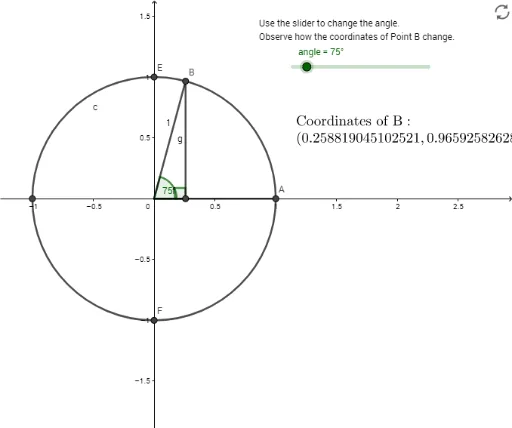
This example further develops the unit circle, involving complex numbers, angles, and transformations. Using GeoGebra commands such as Intersect, Rotate, and Angle, it dynamically constructs points and related geometric objects on the unit circle. Suitable for high school mathematics education and learning.
GeoGebra Commands & Parameters
Intersect(c, xAxis, 1) → DIntersect(xAxis, yAxis) → αIntersect(c, xAxis, 2) → ASegment(D, A) → iRotate(A, angle, α) → BSegment(α, A) → f_1Angle(A, α, B) → βSegment(α, B) → g_1OrthogonalLine(B, i) → hIntersect(h, i) → CSegment(B, C) → gAngle(B, C, α) → γAngle(α, B, C) → δSegment(α, C) → fSurdText(cos(β)) → text2SurdText(sin(β)) → text3Intersect(c, yAxis, 2) → EIntersect(c, yAxis, 1) → F
AI Drawing Prompt Reference
Draw a unit circle and mark the intersection points with the x-axis and y-axis. Connect the right intersection point with the left intersection point to form a horizontal line segment. Rotate this segment counterclockwise around the origin to get a second point. Draw a line segment from the origin to this second point. From the origin, draw a perpendicular line to the horizontal segment, and mark the intersection point. Connect the second point to this intersection point. Label the angles formed by the second point, the origin, and the left intersection point; the second point, the intersection point, and the origin; and the left intersection point, the second point, and the intersection point. Display the cosine and sine values of these angles near the respective angles. Finally, mark the upper and lower intersection points with the y-axis on the circle.
The prompt above was compiled from the original drawing commands and is for reference only.