
Unit Circle and Trigonometry by Morrison Brusett
Loading the math board and drawing, please wait…
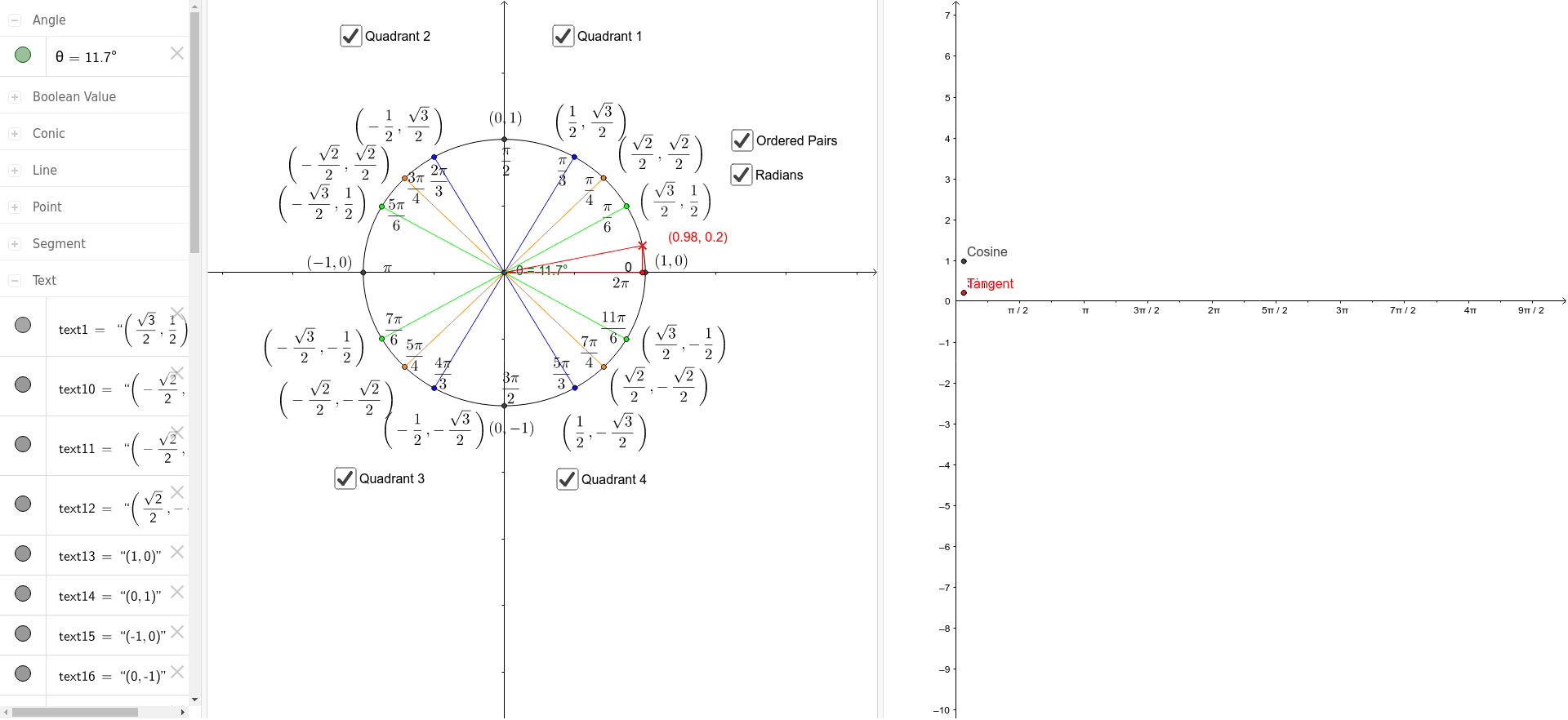
This example dynamically demonstrates the relationship between points on the unit circle and trigonometric functions, visually illustrating the definition of trigonometric functions. Core concepts include the unit circle, trigonometric functions (sine, cosine), angles, and coordinates. GeoGebra commands used in construction include Intersect, Circle, Point, Segment, OrthogonalLine, and Angle. It is suitable for introductory university mathematics or high school analytical geometry teaching, enhancing understanding of the geometric meaning of trigonometric functions.
GeoGebra Commands & Parameters
Intersect(xAxis, yAxis) → ACircle(A, 1) → cIntersect(c, xAxis, 2) → BIntersect(c, yAxis, 2) → CIntersect(c, xAxis, 1) → DIntersect(c, yAxis, 1) → EPoint(c) → GSegment(A, G) → aOrthogonalLine(G, xAxis) → bIntersect(b, xAxis) → HSegment(A, H) → ePoint(c) → JPoint(c) → KPoint(c) → LSegment(A, K) → iSegment(A, L) → jPoint(c) → MPoint(c) → NPoint(c) → OSegment(A, N) → lPoint(c) → PPoint(c) → QPoint(c) → RSegment(A, O) → mSegment(A, P) → nSegment(A, Q) → pSegment(A, R) → qPoint(c) → SPoint(c) → TPoint(c) → USegment(A, S) → rSegment(A, T) → sSegment(A, U) → tAngle(B, A, G) → θSegment(G, H) → a_1Segment(A, J) → b_1Point(b_1) → FSegment(M, F) → k
AI Drawing Prompt Reference
Draw a unit circle and mark the intersection points with the x-axis and y-axis. Draw a ray from the origin that intersects the unit circle at a point. Connect the origin to this point. Draw a perpendicular line from this point to the x-axis and mark the foot of the perpendicular. Mark multiple points on the unit circle and connect each point to the origin, forming several line segments. Label the angle between the ray and the x-axis, and display the sine and cosine values.
The prompt above was compiled from the original drawing commands and is for reference only.