
Two Distances 2 (similar triangles)
Loading the math board and drawing, please wait…
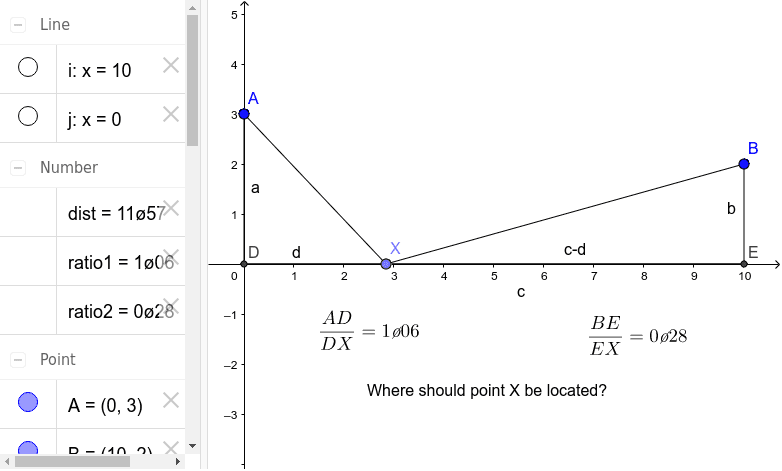
This example demonstrates how to calculate distances between two points using the principle of similar triangles. It involves core mathematical concepts such as the properties and criteria of similar triangles, distance calculation, cosine theorem, and reflection. The construction utilizes GeoGebra commands/objects like Point, Segment, Mirror, Intersect, and OrthogonalLine. Suitable for high school students learning geometry and trigonometry.
GeoGebra Commands & Parameters
Point(xAxis) → XSegment(A, X) → fSegment(X, B) → gMirror(B, xAxis) → B'Segment(X, B') → g'Segment(A, B') → hIntersect(h, xAxis) → COrthogonalLine(B, xAxis) → iOrthogonalLine(A, xAxis) → jIntersect(j, xAxis) → DIntersect(i, xAxis) → ESegment(A, D) → aSegment(B, E) → bSegment(E, D) → cSegment(D, X) → dSegment(E, X) → m
AI Drawing Prompt Reference
Draw two points A and B, and their mirror images B' on the x-axis. Draw a line segment between A and B', intersecting the x-axis at point C. Draw vertical lines through A and B perpendicular to the x-axis, intersecting the x-axis at points D and E. Connect A to D, B to E, D to X, and E to X, resulting in line segments a, b, c, and d, m. Use the principle of similar triangles to calculate the lengths of the line segments.
The prompt above was compiled from the original drawing commands and is for reference only.