
Turning Polygons: Dynamic Geometric Art with Tangent and Scatter Plots
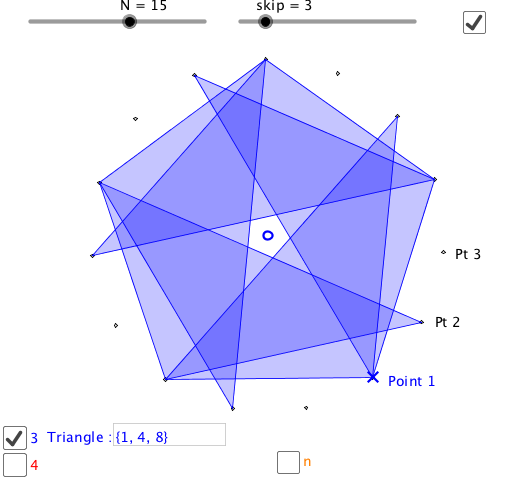
Loading the math board and drawing, please wait…
① This example demonstrates how rotating polygons can generate dynamic mathematical art, combining geometric transformations with function graphs to create visually rhythmic patterns. ② Core mathematical concepts include polygons, line segments, rotation (transformation), difference and slope, tangent function, and scatter plots, highlighting the interplay between algebra and geometry. ③ Construction details: Using GeoGebra commands such as Sequence, Polygon, Textfield, and Length, the construction builds multiple polygon lists (trilist, quadlist, polylist) and point sequences (list1, list2, etc.), with sliders/input boxes (InputBox1-3) controlling parameters (a, b, c, d) and rotation steps (n, skip), and text objects (text1, text2) displaying dynamic values, ultimately producing rotated polygon sequences and scatter plots. ④ Suitable for upper secondary to early university students, this is ideal for exploring geometric transformations, functional relationships, and mathematical art creation, as well as for math experiments or interdisciplinary projects.
GeoGebra Commands & Parameters
Sequence(Rotate[B, ((i * 360) * ° / N), A], i, 0, N - 1) → list1Polygon(Sequence[Element[list1, Mod[Element[trilist, i] - 1, N] + 1], i, 1, 3]) → poly2Sequence(Rotate[poly2, (((i * skip) * 360) * ° / N), A], i, 1, M) → list2Textfield(trilist) → InputBox1Polygon(Sequence[Element[list1, Mod[Element[quadlist, i] - 1, N] + 1], i, 1, 4]) → poly1Sequence(Rotate[poly1, (((i * skip) * 360) * ° / N), A], i, 1, M) → list3Textfield(quadlist) → InputBox2Length(polylist) → nPolygon(Sequence[Element[list1, Mod[Element[polylist, i] - 1, N] + 1], i, 1, n]) → poly3Sequence(Rotate[poly3, (((i * skip) * 360) * ° / N), A], i, 1, M) → list4Textfield(polylist) → InputBox3