
Trochoid: Geometric Construction and Dynamic Visualization
Loading the math board and drawing, please wait…
In collections
geometriadinamica.es
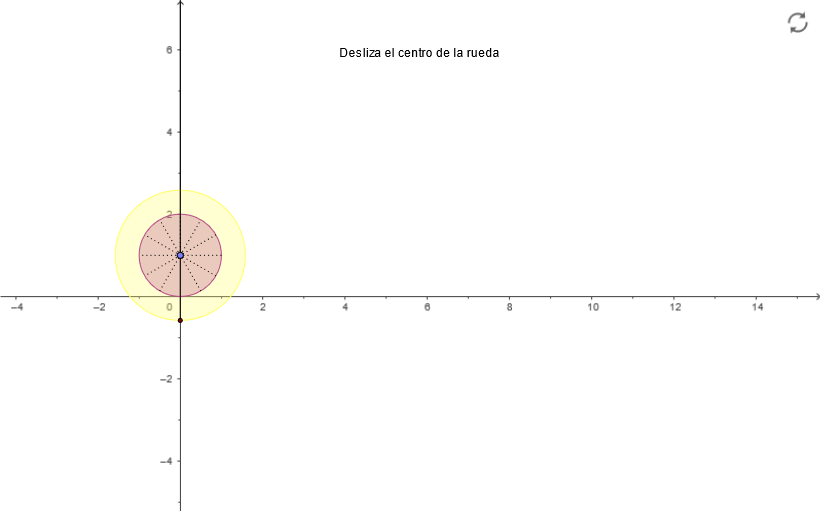
① This example demonstrates the generation of a trochoid, the curve traced by a point attached to a circle as it rolls along a straight line. ② Core mathematical concepts include the cycloid family, parametric curves, rolling motion, geometric loci, and combined transformations of rotation and translation. ③ Construction details: Using GeoGebra commands such as OrthogonalLine, Circle, Point, Ray, Segment, Intersect, and Rotate, the construction sets up a circle C, a line r, a moving point P, and auxiliary points (A, B, D, E, etc.). The trochoid is generated by rotating points and finding intersections to trace the locus. ④ Suitable for high school or undergraduate courses in analytic geometry, parametric equations, or geometric transformations, and for visual math education to illustrate how rolling circles produce different curves depending on the point's position relative to the circle.
GeoGebra Commands & Parameters
OrthogonalLine(C, yAxis) → bPoint(b) → DCircle(D, c) → d_1Point(yAxis) → BRay(C, B) → aPoint(a) → ESegment(D, P) → eIntersect(d_1, e, 1) → SIntersect(xAxis, yAxis) → APoint(a) → FCircle(D, P) → hRotate(S, 29.999999999999996°, D) → GRotate(G, 29.999999999999996°, D) → HRotate(H, 29.999999999999996°, D) → IRotate(I, 29.999999999999996°, D) → JRotate(J, 29.999999999999996°, D) → KRotate(K, 29.999999999999996°, D) → LRotate(L, 29.999999999999996°, D) → MRotate(M, 29.999999999999996°, D) → NRotate(N, 29.999999999999996°, D) → ORotate(O, 29.999999999999996°, D) → QRotate(Q, 29.999999999999996°, D) → RSegment(J, Q) → iSegment(I, O) → jSegment(H, N) → kSegment(G, M) → lSegment(D, L) → mSegment(R, K) → n
AI Drawing Prompt Reference
Draw a diagram illustrating a trochoid from a rolling circle: first set a straight line as the base guide, and define a circle by choosing a center point above the line and a fixed radius. Construct the perpendicular direction from the circle center to locate auxiliary starting points on a ray from the initial circle position. Form connecting segments between the circle center and the moving point, then mark the intersection points between the circle and each constructed segment. Create a chain of rotated positions of one key intersection around the circle center for a series of equal rotation angles, yielding multiple successive points. Finally draw the short segments that connect these rotated points to corresponding auxiliary points, emphasizing the traced curve pattern produced by the rolling motion.
The prompt above was compiled from the original drawing commands and is for reference only.