
Cardioid Curve Construction with GeoGebra
Loading the math board and drawing, please wait…
In collections
geometriadinamica.es
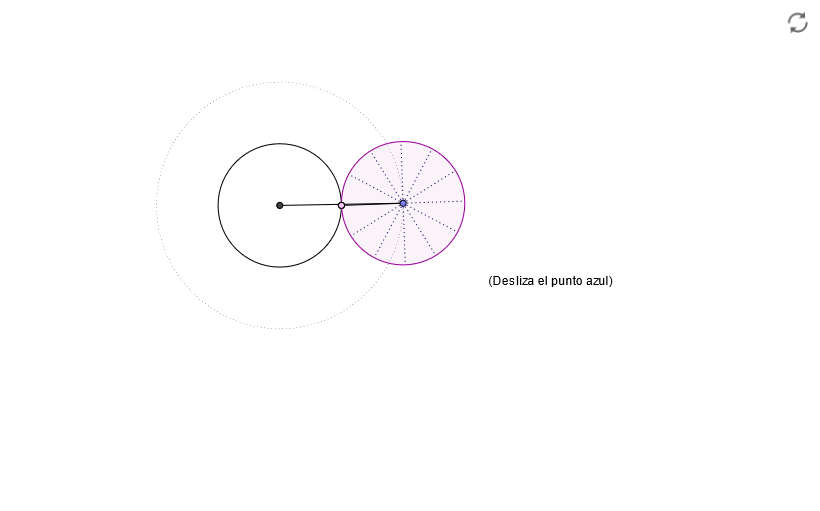
This example demonstrates how to construct a Cardioid curve using GeoGebra. The Cardioid is a heart-shaped curve represented in polar coordinates as r=a(1-cosθ). Key mathematical concepts include: using Locus command to generate the curve path, CircleArc for curve segments, Rotate transformation for symmetry, along with basic geometric tools like Intersect, Point, Segment, and Angle. The construction involves creating points, arcs, rotating elements, and generating the complete locus. Suitable for middle school and high school students learning coordinate geometry, parametric equations, and geometric transformations.
GeoGebra Commands & Parameters
Intersect(xAxis, yAxis) → OCircle(O, 1 + m / n) → dPoint(d) → ARay(O, A) → bAngle(B, O, A) → αCircle(O, B) → cIntersect(c, b) → D,Circle(A, m / n) → eRotate(D, (n * α / m), A) → CSegment(A, C) → aCircleArc(A, D, C) → fCircleArc(O, B, D) → gSegment(O, A) → hRotate(A, 29.999999999999996°, A) → A'Rotate(C, 29.999999999999996°, A) → C'Segment(A', C') → iRotate(A', 29.999999999999996°, A) → A''Rotate(C', 29.999999999999996°, A) → C''Segment(A'', C'') → jRotate(A'', 29.999999999999996°, A) → A'''Rotate(C'', 29.999999999999996°, A) → C'''Segment(A''', C''') → kRotate(A''', 29.999999999999996°, A) → A''''Rotate(C''', 29.999999999999996°, A) → C''''Segment(A'''', C'''') → lRotate(A'''', 29.999999999999996°, A) → A'''''Rotate(C'''', 29.999999999999996°, A) → C'''''Segment(A''''', C''''') → m_1Rotate(A''''', 29.999999999999996°, A) → A''''''Rotate(C''''', 29.999999999999996°, A) → C''''''Segment(A'''''', C'''''') → n_1Rotate(A'''''', 29.999999999999996°, A) → A'''''''Rotate(C'''''', 29.999999999999996°, A) → C'''''''Segment(A''''''', C''''''') → pRotate(A''''''', 29.999999999999996°, A) → A''''''''Rotate(C''''''', 29.999999999999996°, A) → C''''''''Segment(A'''''''', C'''''''') → qRotate(A'''''''', 29.999999999999996°, A) → A'''''''''Rotate(C'''''''', 29.999999999999996°, A) → C'''''''''Segment(A''''''''', C''''''''') → sRotate(A''''''''', 29.999999999999996°, A) → A''''''''''Rotate(C''''''''', 29.999999999999996°, A) → C''''''''''Segment(A'''''''''', C'''''''''') → tRotate(A'''''''''', 29.999999999999996°, A) → A'''''''''''Rotate(C'''''''''', 29.999999999999996°, A) → C'''''''''''Segment(A''''''''''', C''''''''''') → a_1Locus(C, A) → loc1Rotate(D, (n * α / m), A) → E
AI Drawing Prompt Reference
Draw a heart-shaped curve, which is represented in polar coordinates by the equation r=a(1-cosθ. The curve consists of multiple circular arcs and line segments, including a central circle, multiple circular arcs with the same radius, and multiple line segments connecting these arcs to form the outer contour of the heart-shaped curve.
The prompt above was compiled from the original drawing commands and is for reference only.