
Trigonometric Slide Rule: Converting Polar Vectors to Trigonometric Components
Loading the math board and drawing, please wait…
In collections
Vectors - Simmons
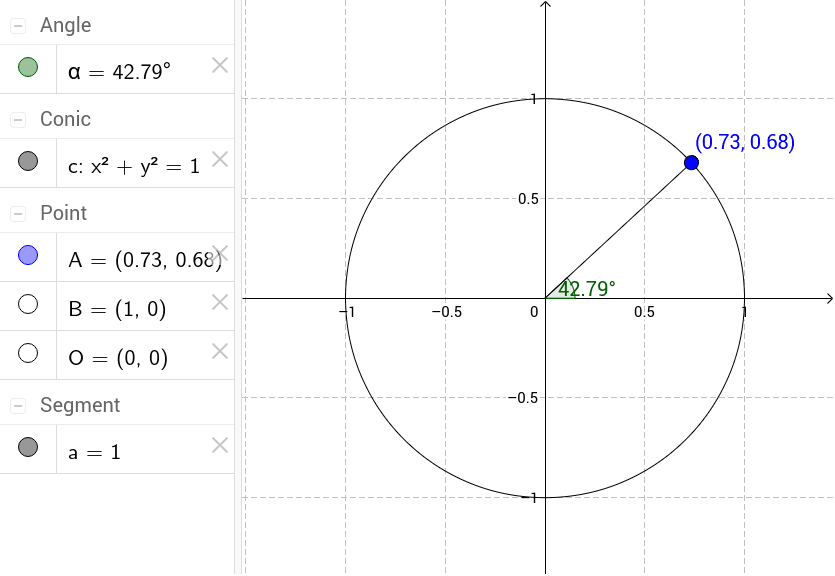
This example demonstrates how to convert a vector given in polar form to its Cartesian (trigonometric) components by using the relationships between a circle's radius, central angle, and trigonometric functions. The core mathematical concepts include: conversion between polar and Cartesian coordinates, application of cosine and sine in circular motion, and the geometric meaning of vector decomposition. Construction details: Use the Circle command to draw a unit circle with center O; use Point to place a moving point A on the circle circumference forming vector OA; use Segment to connect key points forming a right triangle framework; use Angle to measure central angle α for controlling vector direction. By adjusting the angle slider, students can dynamically observe how vector components change with varying angles. Ideal for high school mathematics lessons on trigonometry and vectors, helping students understand geometrically why cosθ and sinθ serve as vector component coefficients.
GeoGebra Commands & Parameters
Circle((0, 0), 1) → cPoint(c) → ASegment(O, A) → aAngle(B, O, A) → α
AI Drawing Prompt Reference
Draw a unit circle centered at the origin. Place a movable point A on the circumference to form vector OA. Adjust the angle slider to change the direction of vector OA and observe how its x and y components vary with the angle. Use the angle tool to measure the angle α between vector OA and the positive x-axis, and construct a right triangle framework to visually demonstrate the decomposition of the vector into sine and cosine components.
The prompt above was compiled from the original drawing commands and is for reference only.