
Trigonometric Ratios in a Right Triangle
Loading the math board and drawing, please wait…
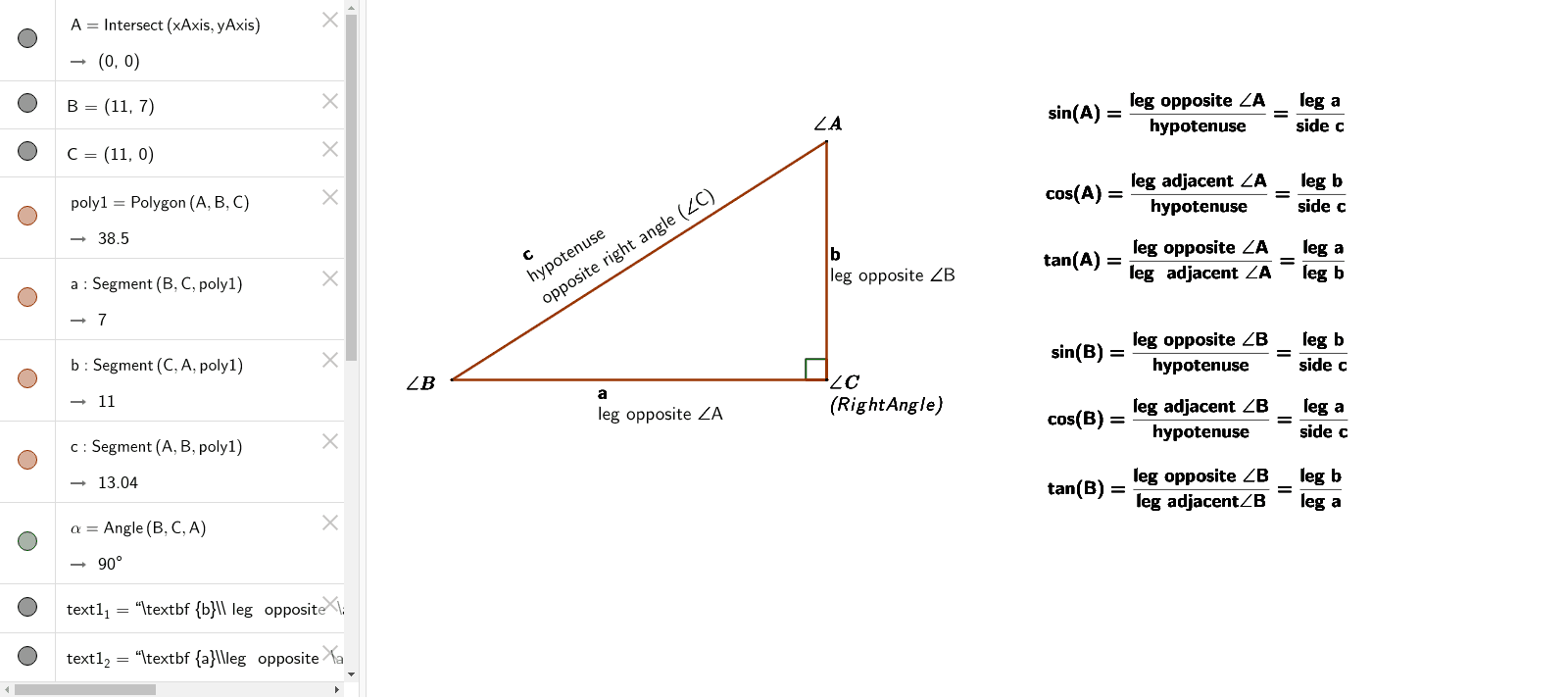
This example demonstrates the concept of trigonometric ratios in a right triangle. By constructing the sides and angles of a right triangle, it shows the definitions of sine, cosine, and tangent. Commands used include Intersect, Polygon, Angle, and RotateText. Suitable for students in middle school and above learning trigonometry.
GeoGebra Commands & Parameters
Intersect(xAxis, yAxis) → APolygon(A, B, C) → poly1, c, a, bAngle(B, C, A) → αRotateText("\textbf {c}\\hypotenuse\\opposite right angle (\angle{C})", 32°) → text10
AI Drawing Prompt Reference
Draw a right triangle with labeled sides and angles, where the largest angle is a right angle and the other two angles are labeled as α. Clearly mark the hypotenuse as c, the opposite side as a, and the adjacent side as b, and display the definitions of sine, cosine, and tangent in the triangle.
The prompt above was compiled from the original drawing commands and is for reference only.