
Trigonometric Ratios Demonstration in Right Triangles
Loading the math board and drawing, please wait…
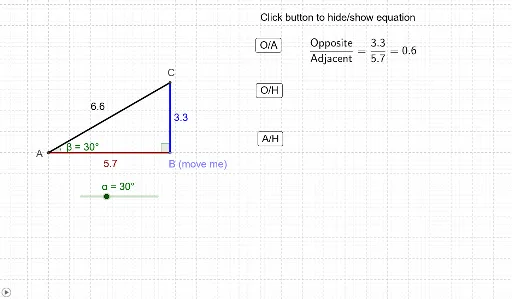
This GeoGebra example visualizes trigonometric ratios within a right triangle context. It explores core concepts such as sine, cosine, and tangent definitions relative to acute angles. The construction utilizes specific commands including Intersect, Rotate, Angle, Line, OrthogonalLine, and Segment to create an interactive geometric model. Users can manipulate points to observe how side ratios change with angle variations. This resource is ideal for middle school or high school students learning foundational trigonometry.
GeoGebra Commands & Parameters
Intersect(xAxis, yAxis) → APoint(xAxis) → BRotate(B, α, A) → B'Angle(B, A, B') → βLine(B', A) → aOrthogonalLine(B, xAxis) → bIntersect(a, b) → CSegment(A, B) → cSegment(B, C) → dSegment(C, A) → eAngle(C, B, A) → γ