
Trig Identities from Similar Right Triangles (I)
Loading the math board and drawing, please wait…
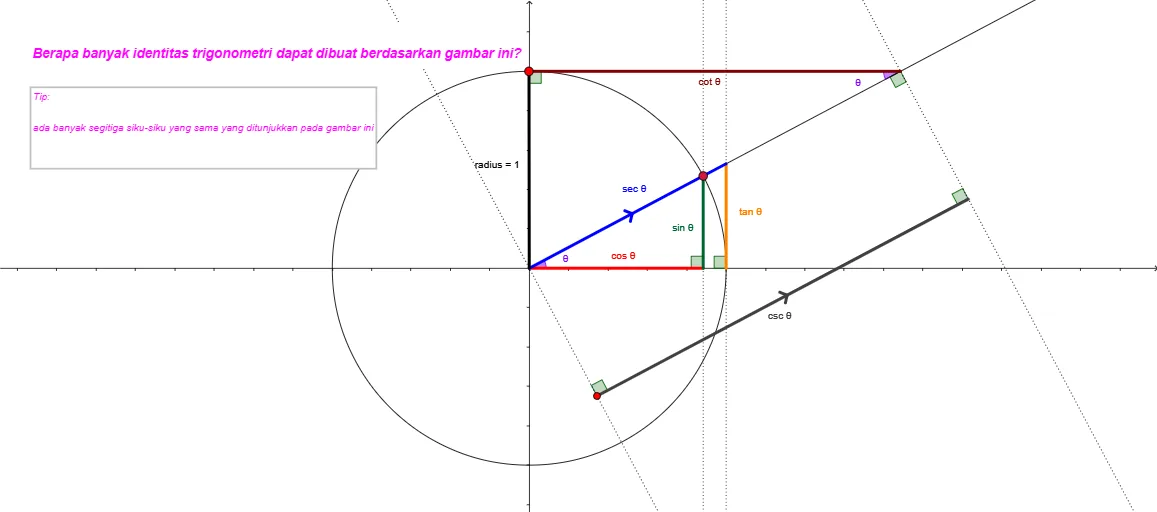
This GeoGebra example constructs two similar right-triangle configurations to demonstrate how trigonometric identities follow directly from geometric similarity and angle definitions. It highlights sine/cosine/tangent relationships in right triangles and uses the correspondence of sides between similar triangles to build and visualize the resulting trig equations. Key math concepts include similarity of triangles, right-triangle trigonometric definitions, angle measurement (such as θ and related angles α, β), and proportion-based reasoning that turns geometric constraints into trigonometric equalities. The construction relies on GeoGebra commands indicated in the construct summary: Point and Circle to place key points and define circular elements; Line, Ray, and Segment to draw triangle sides and auxiliary lines; OrthogonalLine to enforce right angles; Angle to label and control the key angles; and Intersect to locate dependent vertices that complete the similarity structure. The listed objects (multiple labeled vertices, auxiliary segments, radius, and text labels) support a visual proof workflow. Suitable for high-school to early undergraduate trigonometry, especially for intuitive instruction and exploratory verification of trig identities.
GeoGebra Commands & Parameters
Intersect(xAxis, yAxis) → ACircle(A, 1) → cPoint(c) → BRay(A, B) → aOrthogonalLine(B, b) → dIntersect(b, d) → CIntersect(b, xAxis) → DIntersect(c, b) → E, FLine(F, d) → eAngle(b, a) → θSegment(A, B) → fAngle(B, C, A) → αSegment(A, C) → gSegment(C, B) → hIntersect(e, a) → GSegment(F, G) → iAngle(G, F, A) → βLine(G, b) → jSegment(A, G) → lPoint(c) → HSegment(A, H) → radiusOrthogonalLine(I, e) → mIntersect(m, a) → JSegment(I, J) → nAngle(J, I, A) → γAngle(I, J, A) → δOrthogonalLine(J, a) → pLine(A, p) → qPoint(q) → LOrthogonalLine(L, q) → sIntersect(p, s) → MSegment(L, M) → tAngle(J, M, L) → εAngle(M, L, A) → ζAngle(A, J, M) → η
AI Drawing Prompt Reference
In a coordinate plane, start with the intersection of the x- and y-axes as the center, and draw a circle centered at this point with a chosen unit radius. Pick points where this circle and a ray from the center meet to form a right-triangle configuration. From a triangle vertex, construct a line perpendicular to the ray, and determine the key intersection points that complete two similar right-triangle setups. Use additional intersections of the circle with lines defined by those vertices to obtain corresponding points, then connect them with segments to outline the triangle sides. Mark the main angles that arise from the construction, including the angle at the center between the ray and the relevant side, and the corresponding interior angles in the two similar triangles. Add any required auxiliary perpendicular lines and their intersection points so the similarity correspondence is visually clear.
The prompt above was compiled from the original drawing commands and is for reference only.