
Trig Functions on a Unit Circle
Loading the math board and drawing, please wait…
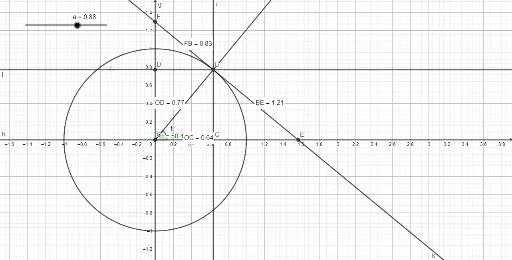
This example dynamically demonstrates trigonometric functions defined on a unit circle, visually linking sine, cosine, and tangent to coordinates of points on the circle. Core math concepts include unit circle, trigonometric definitions, angle-to-coordinate conversion, and trigonometric identities. Construction highlights the use of GeoGebra commands/objects like Intersect, Rotate, Angle, Ray, OrthogonalLine, Distance, and Midpoint. Ideal for high school students and teachers exploring the geometric meaning of trig functions and their applications in analytical geometry.
GeoGebra Commands & Parameters
Intersect(xAxis, yAxis) → ORotate(A, a, O) → A'Angle(A, O, A') → αRay(O, A') → fIntersect(c, f, 1) → BOrthogonalLine(B, h) → iIntersect(h, i) → CDistance(O, C) → distanceOCOrthogonalLine(B, g) → jIntersect(g, j) → DDistance(O, D) → distanceODOrthogonalLine(B, f) → kIntersect(h, k) → EDistance(B, E) → distanceBEMidpoint(B, E) →Intersect(g, k) → FDistance(F, B) → distanceFBMidpoint(F, B) →
AI Drawing Prompt Reference
Draw a unit circle on a coordinate plane and mark the origin. Draw a ray from the origin and mark a point on the ray. Connect this point to the intersection of the ray and the circle. Draw a tangent line at the intersection point and find the other intersection of this line with the circle. Connect the origin to this new intersection point and mark the distance between them. Then, draw a perpendicular line to the tangent at the intersection point and find the other intersection of this line with the circle. Mark the distance between the origin and this new intersection point. Finally, draw another perpendicular line to the tangent at the intersection point and find the other intersection of this line with the circle.
The prompt above was compiled from the original drawing commands and is for reference only.