
Tricity Intersecting Planes: Constructing Intersections of Three Planes in 3D
Loading the math board and drawing, please wait…
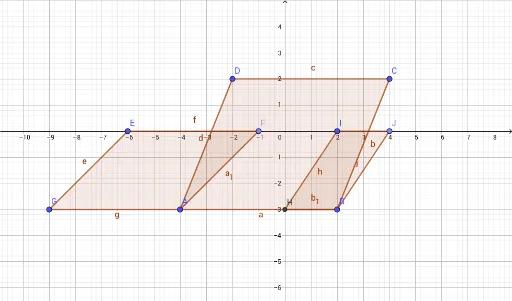
This GeoGebra example demonstrates the geometric phenomenon of three planes intersecting in 3D space, showing how their common intersection point (or line) is determined. It covers core mathematical concepts such as plane equations in 3D coordinate geometry, intersection of planes, points and vectors, and spatial visualization. The construction uses GeoGebra commands: Polygon to create triangular plane faces, Point to define key vertices, and Intersect to compute intersection points between planes. Objects include points A, B, C, D, E, F, G, H, I, J, planes q1, q2, q3, and auxiliary lines a, b, c, d, e, f, g, h, i, j, which together build the intersecting structure step by step. This is suitable for high school or early university students learning solid geometry, spatial vectors, and plane equations, and also serves as a visual teaching aid for instructors explaining plane relationships in 3D.
GeoGebra Commands & Parameters
Polygon(D, A, B, C) → q1, d, a, b, cPoint(xAxis) → FPolygon(G, A, F, E) → q2, g, a_1, f, eIntersect(a, yAxis) → HPoint(xAxis) → JPolygon(I, J, B, H) → q3, i, j, b_1, h
AI Drawing Prompt Reference
Draw three intersecting planes in 3D space to illustrate their common intersection point or line. Begin by defining three vertices for each plane and draw triangular faces to represent them. Then, find the points where the coordinate axes intersect the planes and use these points to draw auxiliary lines. Finally, connect these lines and clearly mark the intersection point or line of the three planes to demonstrate their spatial relationship.
The prompt above was compiled from the original drawing commands and is for reference only.