
Triangle to Square Puzzle
Loading the math board and drawing, please wait…
In collections
Elementary Geometry
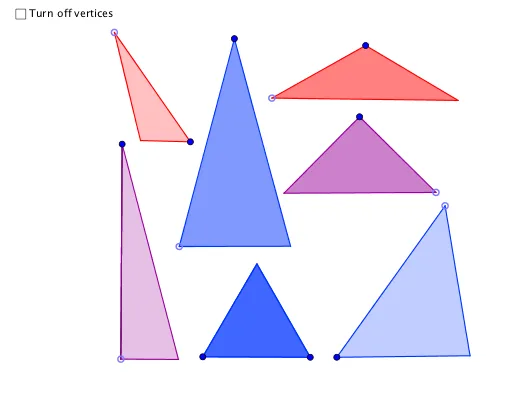
This example demonstrates the geometric transformation of an arbitrary triangle into a square. It involves core mathematical concepts such as coordinate geometry, geometric construction, transformation, and optimization. Key GeoGebra commands and objects used in the construction include Polygon, Midpoint, Circle, Intersect, OrthogonalLine, Line, Distance, Point, Rotate, Segment, and Angle. Suitable for high school and above mathematics learners to understand geometric transformations and optimization problems.
GeoGebra Commands & Parameters
Polygon(A, B, 4) → poly1, a, b, c, d, C, DMidpoint(A, D) → ECircle(E, A) → fCircle(A, E) → gIntersect(f, g, 1) → GCircle(G, E) → hOrthogonalLine(E, d) → iIntersect(h, i, 2) → JPolygon(A, G, E) → poly3, e_1, a_2, g_1Polygon(G, E, J) → poly4, j_1, g_2, e_2Polygon(B, J, A) → poly2, a_1, b_1, jIntersect(f, i) → L, MLine(B, J) → kIntersect(k, c) → NPolygon(B, N, C) → poly6, c_1, b_2, nOrthogonalLine(C, k) → lOrthogonalLine(M, c) → eIntersect(e, c) → OPolygon(O, E, D) → poly5, d_1, o, e_3Polygon(J, O, E) → poly7, e_4, j_2, o_1Polygon(J, O, N) → poly8, n_1, j_3, o_2Polygon(F, H, 3) → poly9, m, p, q, IDistance(F, H) → distanceFHCircle(K, r) → sPoint(s) → PRotate(P, 119.99999999999999°, K) → P'Polygon(K, P, P') → poly10, p', k_1, p_1Circle(Q, r) → tPoint(t) → RSegment(R, Q) → f_1OrthogonalLine(Q, f_1) → h_1Intersect(t, h_1, 2) → SPolygon(R, Q, S) → poly11, s_1, r_1, q_1Circle(T, (2 * r)) → t_1Point(t_1) → URotate(U, 29.999999999999996°, T) → U'Polygon(T, U, U') → poly12, u', t_2, uCircle(V, k_1) → c_2Point(c_2) → WSegment(V, W) → i_1Circle(W, q_1) → d_2Intersect(d_2, i_1, 1) → ZRotate(Z, 45°, W) → Z'Polygon(V, Z', W) → poly13, w, v, z'Circle(A_1, (2 * r)) → f_2Point(f_2) → B_1Segment(A_1, B_1) → l_1OrthogonalLine(B_1, l_1) → m_1Rotate(B_1, 14.999999999999998°, A_1) → C_1Line(A_1, C_1) → h_2Intersect(m_1, h_2) → D_1Polygon(A_1, B_1, D_1) → poly14, d_3, a_3, b_3Circle(E_1, w) → k_2Point(k_2) → F_1Angle(J, O, N) → αRotate(F_1, α, E_1) → G_1Angle(N, J, O) → βRotate(E_1, (-β), F_1) → H_1Line(F_1, H_1) → i_2Line(E_1, G_1) → l_2Intersect(i_2, l_2) → I_1Polygon(F_1, I_1, E_1) → poly15, e_5, f_3, i_3
AI Drawing Prompt Reference
Draw an arbitrary triangle and transform it into a square through geometric constructions. Start by finding the midpoint of one side and use it as a center to draw circles. The intersection points of these circles help form new shapes, gradually transforming the triangle into a square. The process involves coordinate geometry, geometric construction, transformation, and optimization.
The prompt above was compiled from the original drawing commands and is for reference only.