
Triangle Incircle Construction with GeoGebra
Loading the math board and drawing, please wait…
In collections
学习 GeoGebra 经典应用
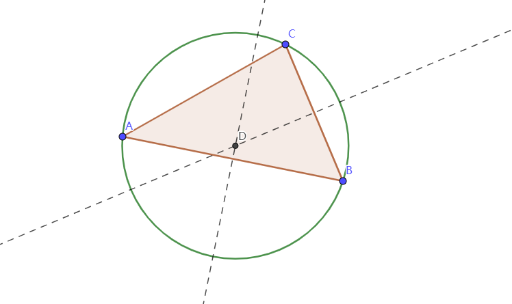
This GeoGebra example demonstrates the geometric construction of a triangle's incircle. The core mathematical concepts include the incircle (a circle inscribed inside a triangle and tangent to all three sides), geometric mean properties, and the perpendicular bisector relationships. Construction key points: Use the Polygon command to create triangle ABC, Midpoint command to find edge midpoints, OrthogonalLine command to draw perpendicular lines from vertices to opposite sides, Intersect command to locate the incenter (intersection of angle bisectors), and Circle command to construct the incircle centered at the incenter. This example is suitable for middle school mathematics teachers demonstrating incircle construction and for students practicing GeoGebra basic operations while understanding the mathematical principles of incenters and incircles.
GeoGebra Commands & Parameters
Polygon(A, B, C) → t1, c, a, bMidpoint(c) → D_1Midpoint(a) → EOrthogonalLine(D_1, c) → fOrthogonalLine(E, a) → gIntersect(f, g) → DCircle(D, B) → d
AI Drawing Prompt Reference
Construct triangle ABC and then its incircle. First draw the triangle, then find the midpoint of side BC (call it D) and the midpoint of side CA (call it E). Through D draw a perpendicular line to BC, and through E draw a perpendicular line to CA. Use the intersection point of these two perpendicular lines as the incenter (D). Finally, draw a circle centered at that point with radius equal to the distance to B, forming the incircle.
The prompt above was compiled from the original drawing commands and is for reference only.