
Triangle Dilation Demo by Ben Dougherty
Loading the math board and drawing, please wait…
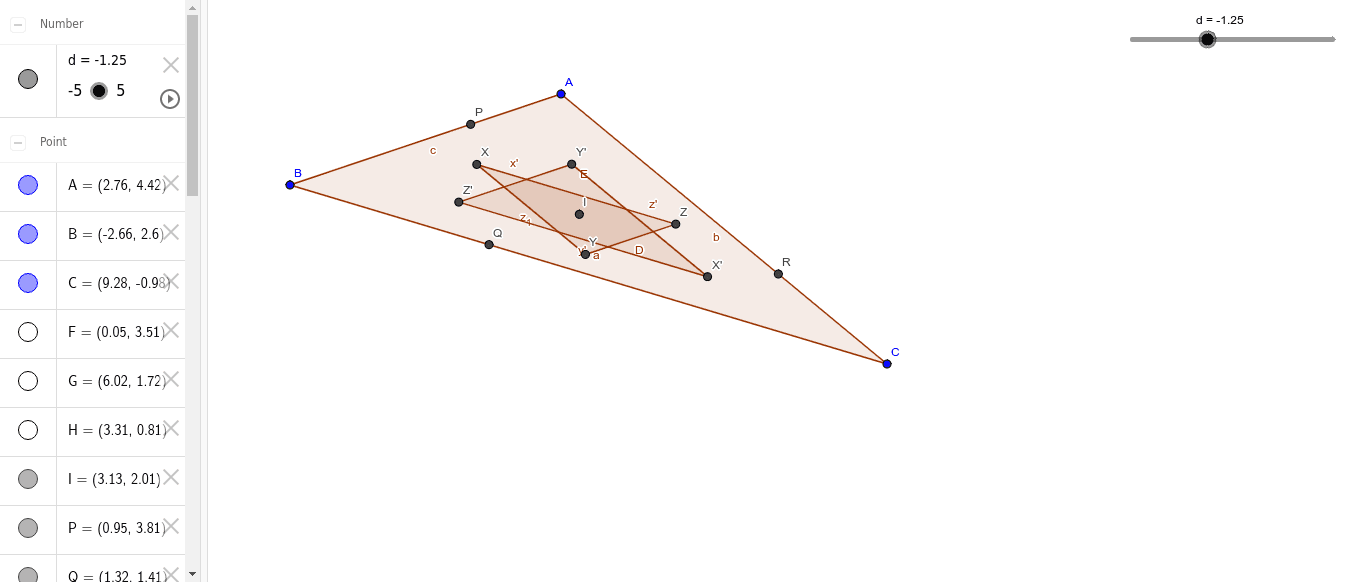
This example demonstrates the dynamic transformation of a triangle through dilation in a coordinate system. It involves core math concepts like dilation transformation, similar figures, ratio relationships, and analytical geometry. Key GeoGebra commands/objects used include Polygon, Midpoint, Segment, Intersect, and Dilate. Suitable for high school students learning geometric transformations, similar figures, and analytical geometry.
GeoGebra Commands & Parameters
Polygon(A, C, B) → poly1, b, a, cPolygon(Y, Z, X) → poly2, D, E, z_1Midpoint(c) → FMidpoint(b) → GMidpoint(a) → HSegment(F, C) → fSegment(A, H) → gSegment(G, B) → hIntersect(f, g) → IDilate(Y, d, I) → Y'Dilate(Z, d, I) → Z'Dilate(X, d, I) → X'Polygon(Y', Z', X') → poly2', x', y', z'
AI Drawing Prompt Reference
Draw a triangle and demonstrate its dilation transformation centered at a point in a coordinate system. Start by drawing an original triangle and a target triangle. Then find the midpoints of each side of the original triangle, connect the midpoints to the vertices to form helper segments, and identify their intersection as the dilation center. Next, scale the target triangle from this center by a certain ratio, and finally draw the scaled triangle to show the formation of similar figures.
The prompt above was compiled from the original drawing commands and is for reference only.