
Triangle Construction on a Pegboard: Problem 2a
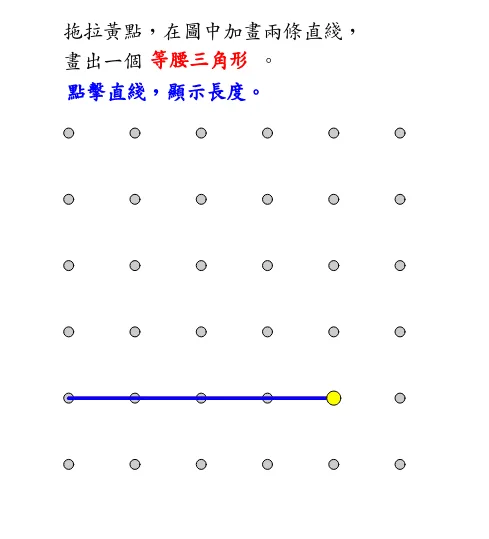
This GeoGebra applet demonstrates how to construct a triangle on a pegboard, illustrating fundamental concepts in geometry through interactive exploration. The construction relies on key GeoGebra commands including Sequence, Polygon, and Angle, allowing students to visualize how points placed on a grid interact to form triangular shapes with precise mathematical relationships.
The applet displays all three side lengths of the triangle, labeled a, b, and c, as well as the interior angles marked alpha, beta, and gamma. Additional angles delta, epsilon, and zeta are also shown, providing a richer view of the angular relationships that emerge when points are connected on the pegboard. These labels help students connect abstract angle notation with concrete visual representations, reinforcing the link between symbolic geometry and graphical intuition.
Ruler-and-compass construction elements are incorporated into the demonstration, reminding learners of the classical geometric foundations behind modern computational tools. The inclusion of sequence generation via the Sequence command shows how ordered sets of points can be systematically produced on the pegboard, enabling students to explore patterns and regularities in triangle configurations.
By manipulating the positions of vertices on the pegboard, users can observe in real time how changes to one side or angle affect the remaining elements of the triangle. This interactivity supports an inquiry-based approach to learning, encouraging students to formulate conjectures about angle sums, side-angle relationships, and the conditions under which different types of triangles can be formed.
The applet is particularly well suited for classroom use at the middle school or early high school level, where students are first encountering formal triangle geometry. It serves both as a demonstration tool for teachers and as a hands-on exploratory platform for students working independently or in small groups. Through direct manipulation and immediate visual feedback, learners develop a deeper understanding of why triangle properties hold, rather than merely memorizing formulas. Overall, this resource bridges the gap between traditional geometric construction and dynamic technology, making abstract concepts tangible and accessible.
In collections
Grade 3 Semester 2: Triangles (Teacher's Edition)
Grade 3 Semester 2: Triangles (Student Edition)
Loading the math board and drawing, please wait…