
Triangle Congruency Postulates Lab
Loading the math board and drawing, please wait…
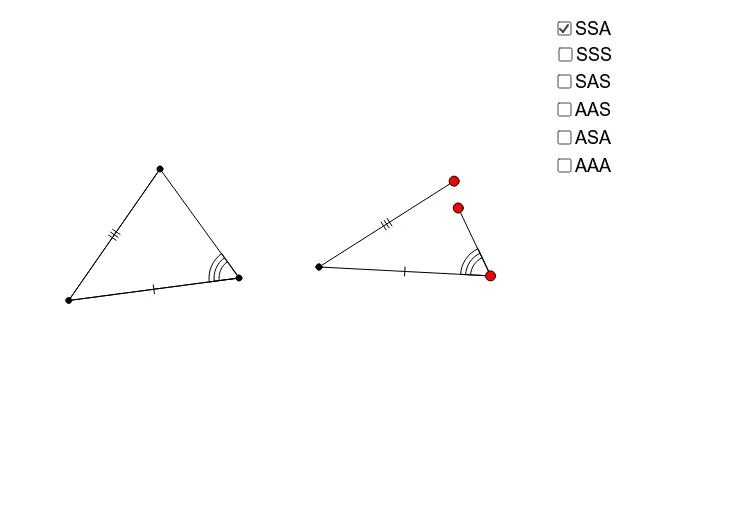
This interactive applet helps students visualize all triangle congruency postulates (excluding those involving right triangles). It covers core concepts like SSS, SAS, ASA, AAS congruence criteria, geometric constructions, and dynamic geometry. The construction utilizes commands such as Segment, Angle, Circle, Point, Rotate, Line, Polygon, DynamicCoordinates, If, Intersect. Ideal for high school mathematics teaching or self-learning to enhance understanding and application of triangle congruency conditions.
GeoGebra Commands & Parameters
Segment(C, A) → bAngle(A, C, B) → γ_cSegment(B, C) → a_cSegment(A, B) → c_cAngle(B, A, C) → α_cAngle(C, B, A) → β_cCircle(H, c_c) → k_{cSSA}Circle(H, a_c) → p_{aSSA}Point(p_{aSSA}) → IPoint(k_{cSSA}) → JCircle(I, b) → q_{bSSA}Segment(H, I) → lSegment(H, J) → mRotate(H, (-γ_c), I) → H'Angle(H', I, H) → δLine(H', I) → dPoint(d) → DPolygon(C, A, B) → poly1, b_{O}, c_{O}, a_{O}Polygon(H, J, D, I) → poly2_1, h, j, b_{SSAc}, iDynamicCoordinates(D, If[Distance[D, J] < 0.13, x(J), x(D)], If[Distance[D, J] < 0.13, y(J), y(D)]) → ESegment(E, I) → b_{SSA}Polygon(H, I, E) → poly3, e_1, h_1, i_1If(poly1 - 1.5 ≤ poly2_1 ≤ poly1 + 1.5 ∧ E ≟ J, true, false) → gCircle(H_1, c_c) → k_{cSSS}Circle(H_1, a_c) → p_{aSSS}Point(p_{aSSS}) → I_1Point(k_{cSSS}) → J_1Circle(I_1, b) → q_{bSSS}Segment(H_1, I_1) → l_1Segment(H_1, J_1) → m_1Point(q_{bSSS}) → K_1Segment(I_1, K_1) → n_1Segment(B, A) → cSegment(A, C) → b_cSegment(B, C) → aDynamicCoordinates(K_1, If[Distance[J_1, K_1] < 0.13, x(J_1), x(K_1)], If[Distance[K_1, J_1] < 0.13, y(J_1), y(K_1)]) → FPolygon(J_1, H_1, I_1) → poly4, i_2, j_2, h_2Point(p_{aSSS}) → GSegment(H_1, G) → eRotate(G, β_c, H_1) → G'Angle(G, H_1, G') → αLine(H_1, G') → fIntersect(k_{cSSA}, f, 2) → KSegment(G, L) → kSegment(H_1, K) → nDynamicCoordinates(L, If[Distance[K, L] < 0.13, x(K), x(L)], If[Distance[L, K] < 0.13, y(K), y(L)]) → MPolygon(H_1, G, M) → poly2, m_2, h_3, g_1Point(p_{aSSS}) → NRotate(N, β_c, H_1) → N'Angle(N, H_1, N') → βRotate(H_1, α_c, N') → OLine(H_1, N) → pSegment(H_1, N) → sLine(H_1, N') → qPoint(q) → PRotate(H_1, α_c, P) → QAngle(H_1, P, Q) → γLine(P, Q) → rSegment(H_1, P) → tPoint(r) → RSegment(P, R) → a_1DynamicCoordinates(R, If[Distance[N, R] < 0.13, x(N), x(R)], If[Distance[R, N] < 0.13, y(N), y(R)]) → SPolygon(S, H_1, P) → poly5, p_1, s_1, h_4Point(p_{aSSA}) → TRotate(T, β_c, H_1) → T'Angle(T, H_1, T') → εRotate(H_1, (-γ_c), T) → UAngle(U, T, H_1) → ζLine(H_1, T') → b_1Line(U, T) → c_1Segment(H_1, T) → d_1Point(c_1) → VPoint(b_1) → WDynamicCoordinates(W, If[Distance[V, W] < 0.13, x(V), x(W)], If[Distance[V, W] < 0.13, y(V), y(W)]) → ZSegment(Z, H_1) → f_1Segment(V, T) → k_1Polygon(H_1, V, T) → poly6, t_1, h_5, vRotate(A_1, β_c, H_1) → B_1Angle(A_1, H_1, B_1) → ηLine(H_1, B_1) → r_1Rotate(H_1, (-γ_c), A_1) → C_1Angle(C_1, A_1, H_1) → θLine(C_1, A_1) → a_2Intersect(r_1, a_2) → D_1Angle(H_1, D_1, A_1) → ιSegment(H_1, A_1) → q_1Segment(D_1, A_1) → b_2Segment(D_1, H_1) → c_2Polygon(A_1, H_1, D_1) → poly7, d_2, a_3, h_6If(a - 0.1 ≤ q_1 ≤ a + 0.1, true, false) → g_2Polygon(H_1, D_1, A_1) → poly8, a_4, h_7, d_3
AI Drawing Prompt Reference
Draw a triangle ABC, then construct congruent triangles based on SSS, SAS, ASA, and AAS conditions to demonstrate dynamic geometric relationships. First, draw the three sides of triangle ABC. Then, construct a triangle using the SSS condition, with its three sides equal to those of ABC. Next, construct a triangle using the SAS condition, with its two sides and included angle equal to those of ABC. After that, construct a triangle using the ASA condition, with its two angles and included side equal to those of ABC. Finally, construct a triangle using the AAS condition, with its two angles and non-included side equal to those of ABC.
The prompt above was compiled from the original drawing commands and is for reference only.