
Triangle Congruence Rules Demo
Loading the math board and drawing, please wait…
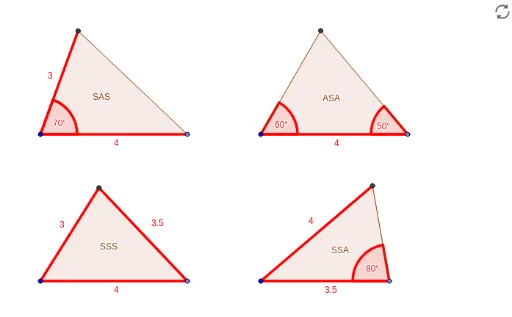
This example demonstrates the principles of triangle congruence rules (SSS, SAS, ASA, AAS) through geometric constructions. It involves core concepts like congruence, geometric transformations, and angle measurement. GeoGebra commands such as Point, Segment, Rotate, Angle, Ray, Circle, Intersect, and Polygon are used to build triangle models and illustrate the criteria. Suitable for middle school and above students for visualizing congruence theorems and applications.
GeoGebra Commands & Parameters
Point(Circle[A, 4]) → BSegment(A, B) → aRotate(B, 70°, A) → B'Angle(B, A, B') → αRay(A, B') → bCircle(A, 3) → cIntersect(c, b, 1) → CPolygon(A, B, C) → poligon1, c_1, a_1, b_1Point(Circle[D, 4]) → ESegment(D, E) → dRotate(E, 60°, D) → E'Angle(E, D, E') → βRotate(D, 310°, E) → D'Angle(D', E, D) → γRay(D, E') → eRay(E, D') → fIntersect(e, f) → FPolygon(D, E, F) → poligon2, f_1, d_1, e_1Point(Circle[G, 4]) → HSegment(G, H) → gCircle(G, 3) → hCircle(H, 3.5) → kIntersect(h, k, 1) → IPolygon(G, H, I) → poligon3, i, g_1, h_1Point(Circle[J, 3.5]) → KSegment(J, K) → jRotate(J, 280°, K) → J'Angle(J', K, J) → δRay(K, J') → lCircle(J, 4) → pIntersect(p, l, 1) → LPolygon(J, K, L) → poligon4, l_1, j_1, k_1
AI Drawing Prompt Reference
Draw a geometric figure consisting of three triangles. Each triangle is formed by three points defined through rotation, intersection, and rays. The first triangle uses points A and B, rotates to B', then intersects a ray and a circle to get point C. The second triangle starts from point D, rotates to E', then intersects rays and circles to get point F. The third triangle starts from point G, rotates to H', then intersects rays and circles to get point I. Ensure the figure clearly shows the construction process and key point relationships.
The prompt above was compiled from the original drawing commands and is for reference only.