
Triangle Area by Judah L Schwartz
Loading the math board and drawing, please wait…
In collections
Functions on the Domain of Space - Polygons
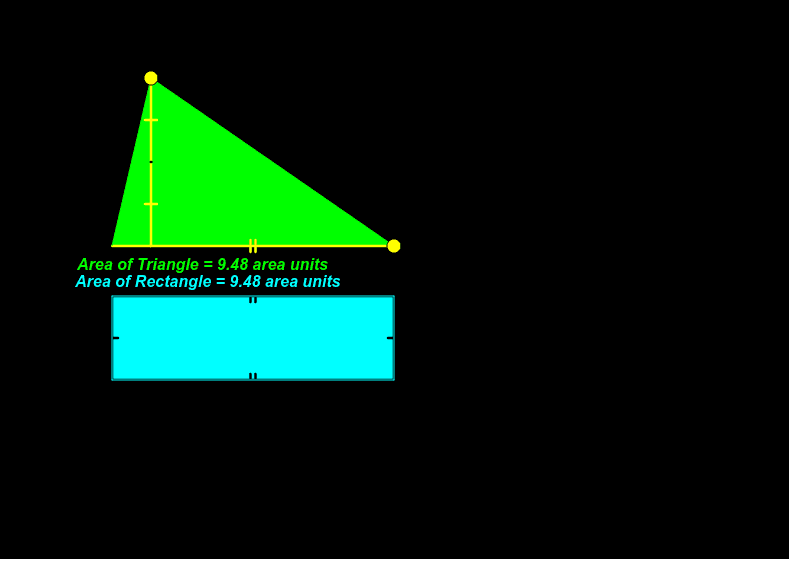
This example demonstrates how to calculate the area of a triangle using geometric construction methods. Key math concepts include circles, midpoints, intersections, and equilateral triangles. It involves GeoGebra commands/objects like Point, Polygon, Segment, Midpoint, Circle, Intersect. Suitable for high school mathematics teaching or exploration by math enthusiasts.
GeoGebra Commands & Parameters
Point(xAxis) → BPolygon(A, B, C) → poly1, c, a, bSegment(C, D) → dMidpoint(d) → ESegment(C, E) → eSegment(E, D) → fSegment(F, G) → hCircle(F, e) → kCircle(G, e) → pIntersect(k, yAxis) → H, IIntersect(p, g) → J, KSegment(H, K) → iSegment(F, H) → jSegment(G, K) → lPolygon(F, G, K, H) → poly2, f_1, g_1, k_1, h_1
AI Drawing Prompt Reference
Draw a triangle, find the midpoint of one side, and draw a circle with the midpoint as the center. Then, form an equilateral triangle using the midpoint and the two vertices of the triangle. Next, draw two circles using the vertices of the equilateral triangle and the midpoint as centers. These circles intersect the coordinate axes, and connecting the intersection points with the relevant vertices creates a complex shape composed of smaller triangles.
The prompt above was compiled from the original drawing commands and is for reference only.