
Trapezoid Mid-Segment: 2 Discoveries
Loading the math board and drawing, please wait…
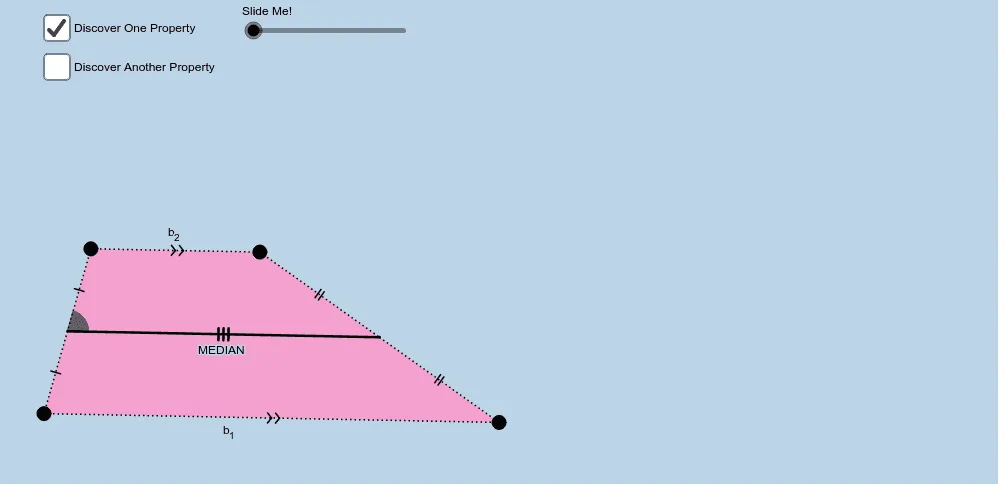
① This GeoGebra example dynamically demonstrates two key properties of the trapezoid mid-segment (the segment connecting the midpoints of the legs): it is parallel to both bases and its length equals half the sum of the bases. ② The core mathematical concepts include the trapezoid mid-segment theorem, parallel lines, similar triangles, midpoints, segment ratios, and invariance under geometric transformations such as rotation, dilation, and translation. ③ Construction highlights: using GeoGebra commands like Ray, Segment, Line, Point, Polygon, Midpoint to build the trapezoid and its midpoints; applying Rotate, Dilate, Translate, Vector to create auxiliary figures; using Circle, Intersect, CircleSector to generate arcs and intersection points, forming two 'proofs without words' that visually reveal the relationships through rotated triangles, scaled polygons, and translated segments. ④ Suitable for upper middle school or high school students to grasp the geometric essence of the trapezoid mid-segment theorem, and also valuable for teachers as a classroom demonstration or for student inquiry into geometric proof, emphasizing discovery through transformation.
GeoGebra Commands & Parameters
Ray(A, B) → aSegment(A, B) → bLine(C, b) → cPoint(c) → DRay(C, D) → dPoint(d) → ESegment(C, A) → eSegment(C, E) → fSegment(E, B) → gPolygon(A, B, E, C) → poly1, a_1, b_1, e_1, c_1Midpoint(e) → FMidpoint(g) → GSegment(F, G) → hRotate(A, (-α), G) → A'Rotate(B, (-α), G) → B'Rotate(E, (-α), G) → E'Rotate(C, (-α), G) → C'Polygon(A', B', E', C') → poly1', a', b', e', c'Rotate(F, (-α), G) → F'Rotate(G, (-α), G) → G'Segment(F', G') → h'Segment(B', A') → iSegment(A', C') → jSegment(C', E') → kSegment(E', B') → lSegment(C, F) → mSegment(F, A) → nSegment(E, G) → pSegment(G, B) → qSegment(C', F') → rSegment(F', A') → sLine(C, A) → tCircle(F, 1) → f_1Intersect(f_1, h, 1) → JIntersect(t, m) → KIntersect(t, m) → LIntersect(f_1, t) → M, NCircleSector(F, J, M) → h_1Dilate(F, 1 - o, A) → F'_1Dilate(F, 1 - o, C) → F'_2Vector(F, F'_2) → uVector(F, F'_1) → vTranslate(h_1, v) → k_1Translate(h_1, u) → p_1Dilate(F, If[0 < w ≤ 1, 1 - w, 0], C) → F'_3Vector(F, F'_3) → u_1Translate(G, u_1) → G'_1Segment(F'_3, G'_1) → d_1Dilate(F, If[1 < w ≤ 2, 2 - w, 0], C) → F'_4Vector(F, F'_4) → v_1Translate(F', v_1) → F''Translate(G, v_1) → G'_2Segment(G'_2, F'') → g_1
AI Drawing Prompt Reference
Draw a trapezoid with a horizontal bottom base and a slanted top base, connected by two legs. Mark the midpoints of both legs and connect them to form the mid-segment. Rotate the entire trapezoid around the midpoint of one leg by a certain angle, keeping the original trapezoid visible. In the rotated trapezoid, connect vertices with auxiliary segments, and label the four sub-segments of the original legs created by the midpoints. Draw a small circle centered at one leg's midpoint, intersecting the mid-segment and a diagonal, forming a sector. Translate this sector in two directions, and construct a segment whose length varies with a parameter to illustrate the relationship between the mid-segment length and the sum of the bases. The final figure includes two trapezoids, mid-segments, rotated corresponding segments, a circle, a sector, and translated copies.
The prompt above was compiled from the original drawing commands and is for reference only.