
Trapezoid Area Calculation by GeoGebra Materials Team
Loading the math board and drawing, please wait…
In collections
Area, Surface Area, Volume--Nets
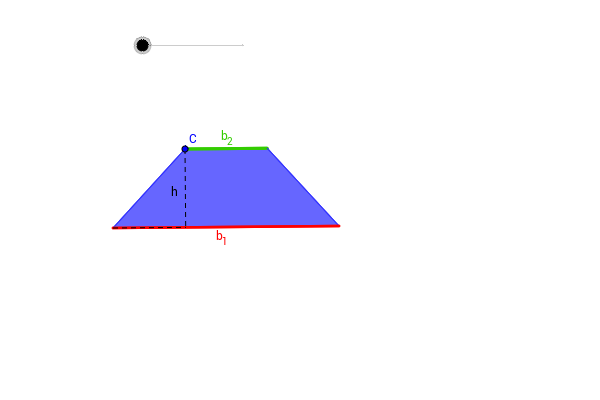
This example demonstrates how to dynamically calculate the area of a trapezoid. It involves core mathematical concepts like trapezoid definition, area formula, coordinate geometry, midpoint, rotation, perpendicular line, intersection, and conditional statements. GeoGebra commands and objects used include Segment, Line, Point, Polygon, Midpoint, Rotate, OrthogonalLine, Intersect, If. Suitable for middle school students and above learning geometric constructions and area calculations, as well as high school coordinate geometry instruction.
GeoGebra Commands & Parameters
Segment(A, B) → aLine(C, a) → bPoint(b) → DPolygon(A, C, D, B) → P, a_1, b_2, d, b_1Midpoint(D, B) → ERotate(A, -α, E) → A'Rotate(C, -α, E) → C'Rotate(D, -α, E) → D'Rotate(B, -α, E) → B'Polygon(A', C', D', B') → P', a', c', d', b'Line(A, B) → eOrthogonalLine(C, e) → fIntersect(f, e) → FSegment(C, F) → hSegment(A, F) → cMidpoint(B', A') → GMidpoint(D', C') → HIf(α ≥ 0 °, H) → IIf(α > 0 °, H) → JIf(α > 0 °, G) → K
AI Drawing Prompt Reference
Draw a trapezoid area calculation diagram. It involves concepts like trapezoid definition, area formula, coordinate geometry, midpoint, rotation, perpendicular line, intersection, and conditional statements. Key objects include segments, lines, points, polygons, midpoints, rotations, perpendicular lines, intersections, and segments. The construction order is: first draw a segment, then draw a line and find a point, draw a polygon, find a midpoint, rotate points to form a new polygon, draw a line, perpendicular line, and intersection, finally draw a segment and find a midpoint.
The prompt above was compiled from the original drawing commands and is for reference only.