
Trapezium Rule Estimation Example
Loading the math board and drawing, please wait…
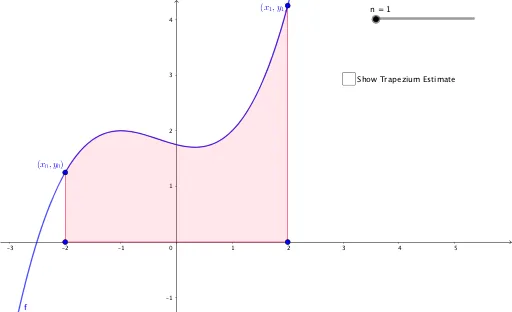
This example demonstrates the trapezium rule, a numerical integration method. Key mathematical concepts include functions, integrals, and geometric construction. Using GeoGebra commands such as Point, Integral, and Polygon, the principle of the trapezium rule is dynamically illustrated. Suitable for high school mathematics education and learning.
GeoGebra Commands & Parameters
Point(f) → APoint(f) → EIntegral(f, -2, 2) → aPolygon(A1, A, B, B1) → q1, a1, a_1, b, b1Polygon(C, D, D1, C1) → q3, c_1, d, d1, c1_1Polygon(B, C, C1, B1) → q2, b_1, c, c1, b1_1Polygon(D, E, E1, D1) → q4, d_1, e, e1, d1_1
AI Drawing Prompt Reference
Draw the graph of function f from -2 to 2, and approximate the integral by constructing four trapezoids. First, take points A and E at x=-2 and x=2, then calculate the integral a. Next, construct trapezoids q1, q2, q3, and q4 to approximate the function in different intervals.
The prompt above was compiled from the original drawing commands and is for reference only.