
Trapezium Area Calculation by Karis (2)
Loading the math board and drawing, please wait…
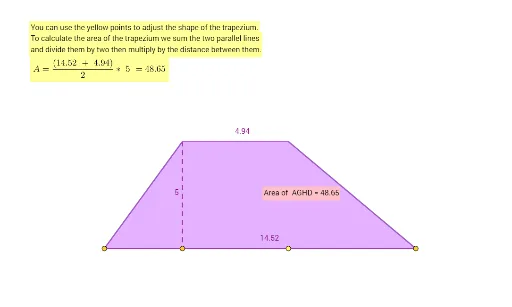
This example demonstrates how to dynamically calculate the area of a trapezium using GeoGebra. It involves core mathematical concepts such as trapezoid definition, area formula, and coordinate geometry. Key GeoGebra commands used include Point, Segment, Intersect, Polygon, and PointIn to construct the trapezium and compute its area. Suitable for middle school students and math enthusiasts for learning and verifying geometric formulas.
GeoGebra Commands & Parameters
Point(f) → APoint(f) → BPoint(f) → CPoint(f) → DSegment(D, F) → jSegment(F, E) → kSegment(E, A) → lSegment(E, B) → mSegment(F, C) → nIntersect(k, l) → GIntersect(j, k) → HPolygon(A, G, H, D) → q1, a, g_1, h_1, dSegment(A, D) → gPointIn(q1) → Pointq1
AI Drawing Prompt Reference
Draw a trapezium on a coordinate plane with four vertices on a straight line, ensuring the two bases are parallel. Start by placing four points on the line as the vertices, then connect adjacent points to form four sides: two bases and two legs. Extend the two legs until they intersect at a point above, and also extend the upper base to meet one leg at another point, creating a triangular region above the trapezium. Connect the two lower base vertices with a segment, and construct a polygon using the intersection points and the lower base vertices, which represents the trapezium. Finally, place a point inside this polygon to indicate the area to be calculated.
The prompt above was compiled from the original drawing commands and is for reference only.