
Translation using vector notation
Loading the math board and drawing, please wait…
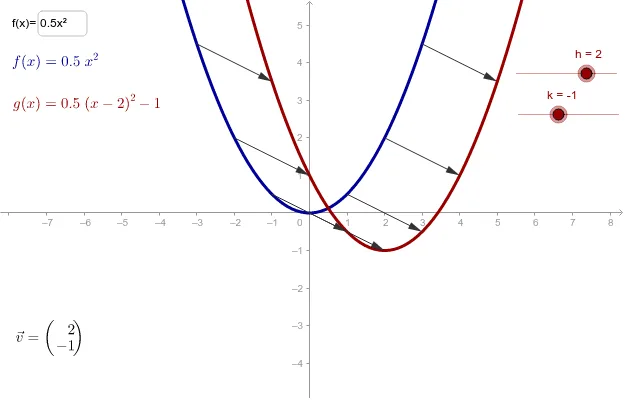
This example demonstrates how to use vector notation to translate function graphs. Key math concepts include vectors, function graphs, and translation transformations. Constructed using GeoGebra commands like Textfield and Vector, and objects such as h, f, k, g, v, etc. Suitable for high school students learning about function translations and deepening their understanding of the concept through vector representation.
GeoGebra Commands & Parameters
Textfield(f) → inputBox1Vector(B1, (x(B1) + h, y(B1) + k)) → C1Vector(B2, (x(B2) + h, y(B2) + k)) → C2Vector(B3, (x(B3) + h, y(B3) + k)) → C3Vector(B4, (x(B4) + h, y(B4) + k)) → C4Vector(B5, (x(B5) + h, y(B5) + k)) → C5Vector(B6, (x(B6) + h, y(B6) + k)) → C6Vector(B7, (x(B7) + h, y(B7) + k)) → C7Vector(B8, (x(B8) + h, y(B8) + k)) → C8Vector(B9, (x(B9) + h, y(B9) + k)) → C9Vector(B10, (x(B10) + h, y(B10) + k)) → C10Vector(B11, (x(B11) + h, y(B11) + k)) → C11Vector(B12, (x(B12) + h, y(B12) + k)) → C12Vector(B13, (x(B13) + h, y(B13) + k)) → C13Vector(B14, (x(B14) + h, y(B14) + k)) → C14Vector(B15, (x(B15) + h, y(B15) + k)) → C15Vector(B16, (x(B16) + h, y(B16) + k)) → C16Vector(B17, (x(B17) + h, y(B17) + k)) → C17
AI Drawing Prompt Reference
Draw a function graph and demonstrate translation using vector notation. First, input the function expression, then translate each point along the vector (h, k), where h and k are the coordinates of the translation vector. Observe the changes in the function graph to understand the concept of translation.
The prompt above was compiled from the original drawing commands and is for reference only.