
Tracking a Basketball's Path with Parabolas
Loading the math board and drawing, please wait…
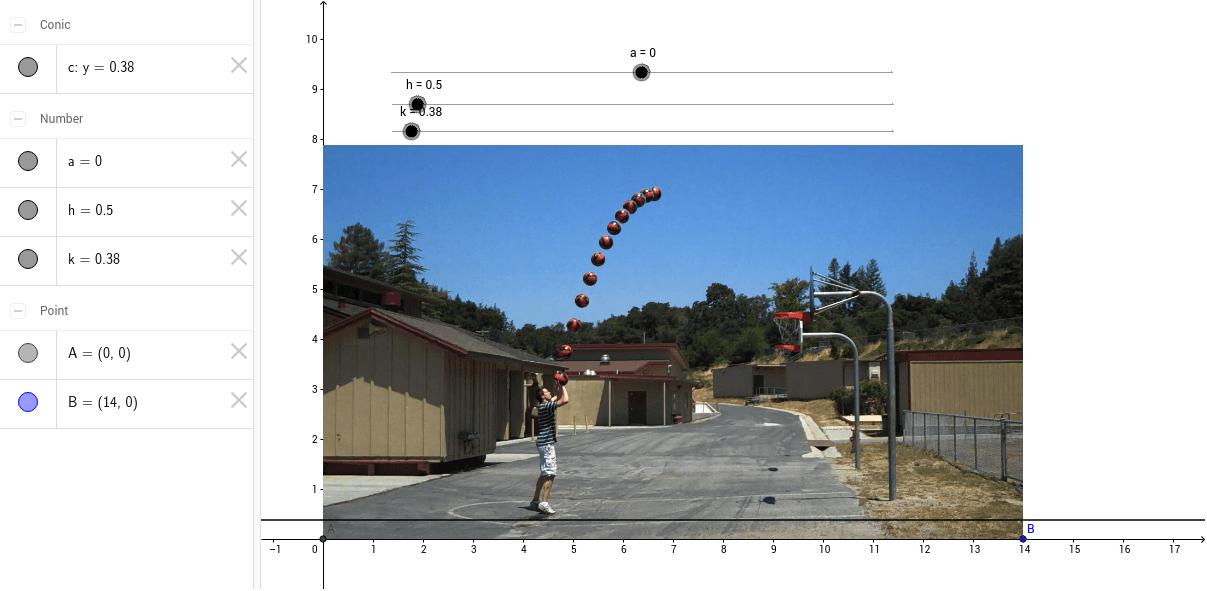
This example demonstrates how to track a basketball's trajectory using a parabola. Key math concepts include parabola equations, quadratic functions, and parameter adjustments. It is constructed using GeoGebra's Intersect command to find points A and B, with parameters a, h, k to modify the parabola, and pic1 to visualize the ball's path. Ideal for high school mathematics education, combining quadratic functions with real-world motion.
GeoGebra Commands & Parameters
Intersect(xAxis, yAxis) → A
AI Drawing Prompt Reference
Draw a parabolic trajectory for a basketball, showing the intersection points with the coordinate axes, adjust parameters to modify the parabola's shape, and use an image to visualize the ball's path, demonstrating the connection between quadratic functions and real-world motion.
The prompt above was compiled from the original drawing commands and is for reference only.