
The M-Machine: A Geometric Interpretation of Multiplication
Loading the math board and drawing, please wait…
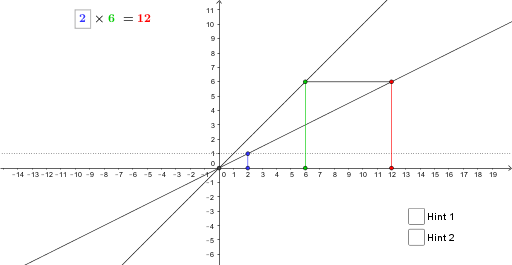
This example uses geometric figures to illustrate the concept of multiplication. It involves key mathematical concepts such as geometry, vectors, and functions. By using GeoGebra commands like Point, Intersect, and OrthogonalLine, a dynamic geometric model is constructed to help students understand the geometric interpretation of multiplication. Suitable for students at the middle school level and above.
GeoGebra Commands & Parameters
Point(xAxis) → AIntersect(f, xAxis) → DOrthogonalLine(A, xAxis) → gIntersect(i, g) → BSegment(A, B) → hLine(B, D) → jPoint(xAxis) → COrthogonalLine(C, xAxis) → kIntersect(f, k) → EOrthogonalLine(F, xAxis) → lIntersect(j, l) → GSegment(C, E) → mSegment(E, G) → pIntersect(f, j) → HPolygon(A, B, H) → poly1, h_1, a, bSegment(G, F) → qPolygon(G, H, F) → poly2, f_4, g_1, h_2
AI Drawing Prompt Reference
Draw a coordinate plane with a horizontal axis and a curve intersecting the axis at one point. Place two points on the axis, and from each draw a vertical line up to the curve. From the first axis point, draw a vertical segment to its curve intersection, then a line from that intersection to the axis intersection point. From the second axis point, draw a vertical line to the curve, then a horizontal line from that curve point to meet the previous line. Connect the relevant points to form two triangles, and show all segments clearly.
The prompt above was compiled from the original drawing commands and is for reference only.