
TFish Angle Addition Puzzle: Supplementary Angles via Rotation
Loading the math board and drawing, please wait…
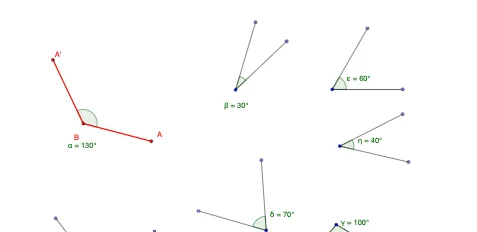
This example demonstrates a TFish-style geometric construction where rotations produce a configuration that enables angle-addition verification. It uses supplementary-angle relationships to confirm the target angle equations visually and computationally. The key math concepts are angle addition, supplementary (and related) angle properties, angle preservation under rotation transformations, and the way structured construction points lead to consistent angle labels. Construction relies on GeoGebra commands Point (for many labeled construction points such as A, B, C, D, E and their primed counterparts), Segment (to create the defining lines/edges), Rotate (to generate the rotated counterparts that align the angle chains), and Angle (to measure and display the resulting angles like α, β, γ, δ, ε, ζ, etc., together with the corresponding primed-angle labels). The design is intended for learners studying geometry proofs with dynamic geometry tools, and it works well for middle school through early university audiences practicing transformation geometry and reasoning about angle relationships.
GeoGebra Commands & Parameters
Point(Circle[A, 2]) → BSegment(A, B) → aRotate(A, 130°, B) → A'Angle(A, B, A') → αSegment(B, A') → bPoint(Circle[C, 2]) → DSegment(C, D) → cRotate(D, 30°, C) → D'Angle(D, C, D') → βSegment(C, D') → dPoint(Circle[E, abs(2)]) → FSegment(E, F) → eRotate(F, 100°, E) → F'Angle(F, E, F') → γSegment(E, F') → fPoint(Circle[G, abs(2)]) → HSegment(G, H) → gRotate(H, 70°, G) → H'Angle(H, G, H') → δSegment(G, H') → hPoint(Circle[I, abs(2)]) → JSegment(I, J) → iRotate(J, 60°, I) → J'Angle(J, I, J') → εSegment(I, J') → jPoint(Circle[K, abs(2)]) → LSegment(K, L) → kRotate(L, 90°, K) → L'Angle(L, K, L') → ζSegment(K, L') → lPoint(Circle[M, abs(2)]) → NSegment(M, N) → mRotate(N, 40°, M) → N'Angle(N, M, N') → ηSegment(M, N') → n
AI Drawing Prompt Reference
Draw a planar geometry setup with several groups of points arranged on circles. For each group, create two key points on a circle centered at a given base point, then connect them with a segment to form the defining lines of an angle. Next, repeatedly perform fixed-center rotations: using the base point as the rotation center, rotate the other point by the specified angle to obtain a corresponding primed point. For each rotation, form an angle using the base point, the pre-rotation point, and the post-rotation (primed) point, and display that angle as a named value. Also draw the segments from the relevant circle points to the primed points so the sequence of rotated rays creates a consistent chain of supplementary-angle style comparisons.
The prompt above was compiled from the original drawing commands and is for reference only.