
Tesseract Rotations
Loading the math board and drawing, please wait…
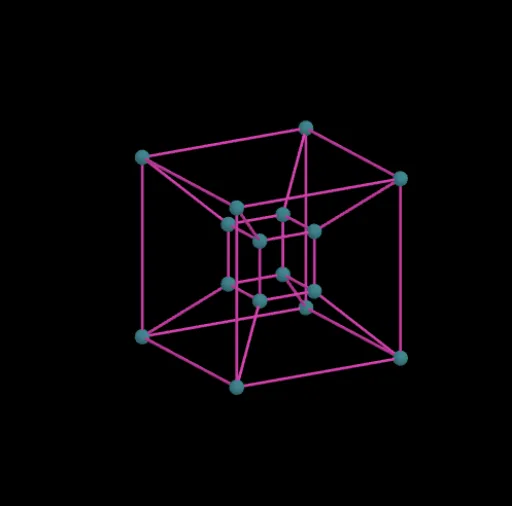
This GeoGebra example demonstrates the rotation of a 4-dimensional tesseract. It involves geometric transformations in 4-dimensional space, particularly rotations. By adjusting angles and observing the movement of points, one can intuitively understand the geometric transformations in 4-dimensional space. The construction uses commands such as Segment, angle, distance, and rotation. Suitable for high school students and math enthusiasts interested in 4-dimensional geometry.
GeoGebra Commands & Parameters
Segment(A0, A1) → B0Segment(A1, A2) → B1Segment(A2, A3) → B2Segment(A3, A0) → B3Segment(A4, A5) → C0Segment(A5, A6) → C1Segment(A6, A7) → C2Segment(A7, A4) → C3Segment(A0, A4) → D0Segment(A1, A5) → D1Segment(A2, A6) → D2Segment(A3, A7) → D3Segment(A8, A9) → E0Segment(A9, A10) → E1Segment(A10, A11) → E2Segment(A11, A8) → E3Segment(A12, A13) → F0Segment(A13, A14) → F1Segment(A14, A15) → F2Segment(A15, A12) → F3Segment(A8, A12) → G0Segment(A9, A13) → G1Segment(A10, A14) → G2Segment(A11, A15) → G3Segment(A0, A8) → H0Segment(A1, A9) → H1Segment(A2, A10) → H2Segment(A3, A11) → H3Segment(A4, A12) → H4Segment(A5, A13) → H5Segment(A6, A14) → H6Segment(A7, A15) → H7
AI Drawing Prompt Reference
Draw a 4-dimensional hypercube (tesseract) as a wireframe projection. The figure consists of two sets of parallel square faces, each with four vertices, totaling sixteen vertices. First, connect the four vertices of each square face with line segments to form two separate squares. Then, connect corresponding vertices between these two squares with four edges. Next, draw another pair of squares and their connecting edges. Finally, connect all corresponding vertices between the two sets of squares to complete the full framework. All edges should be clearly visible, vertices may be marked as small dots, and the overall shape should appear as a 3D projection, with adjustable rotation angles to illustrate motion in 4D space.
The prompt above was compiled from the original drawing commands and is for reference only.