
Tangent Line of Triangle and Circle
Loading the math board and drawing, please wait…
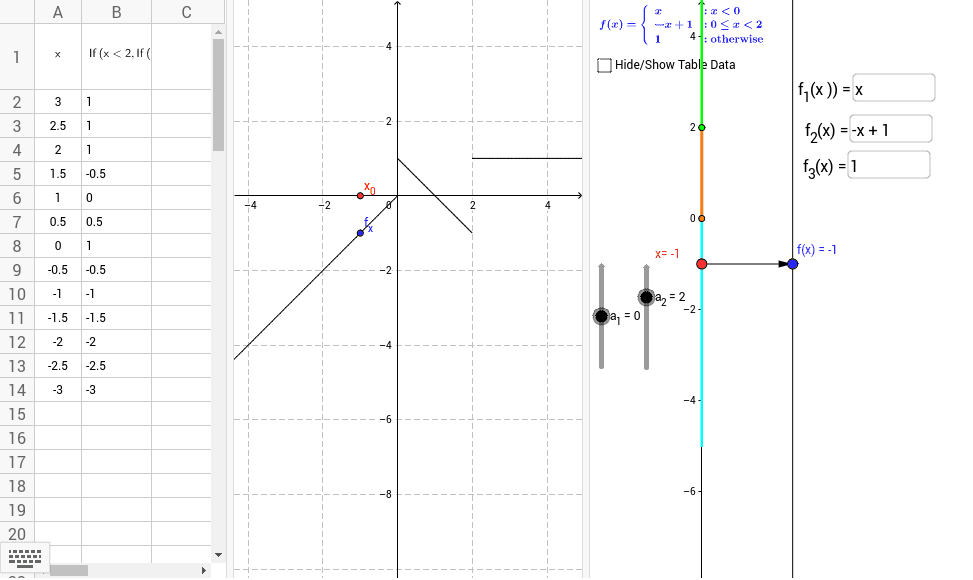
This example demonstrates the relationship between a triangle and a circle, specifically focusing on the tangent lines. Key mathematical concepts include triangles, circles, and tangents. Using GeoGebra commands such as Point, Vector, and Segment, the construction of a triangle and a circle, and the observation of their tangent lines, is illustrated. Suitable for middle school and above students or teachers.
GeoGebra Commands & Parameters
Point(yAxis) → A_1Vector(A_1, B) → uSegment((0, -5), (0, a_1)) → cSegment((0, a_1), (0, a_2)) → dSegment((0, a_2), (0, 5)) → eTextfield(f_1) → inputBox1Textfield(f_2) → inputBox2Textfield(f_3) → inputBox3Textfield(f_1) → inputBox4Textfield(f_2) → inputBox5Sequence(Vector[(0, k), (2, f(k))], k, -3, 3, 0.5) → list1Sequence((k, f(k)), k, -3, 3, 0.5) → list2Textfield(f_3) → inputBox6
AI Drawing Prompt Reference
Draw a figure showing the relationship between a triangle and a circle, focusing on tangent lines. Start by plotting three points to form a triangle, then draw the triangle. Next, draw a circle near the triangle. From one vertex of the triangle, draw a tangent line that touches the circle and mark the point of tangency. Finally, plot a function's graph in the coordinate system and represent the direction of the tangent line with a vector.
The prompt above was compiled from the original drawing commands and is for reference only.