
Symmetry in a Circle by A McCormick
Loading the math board and drawing, please wait…
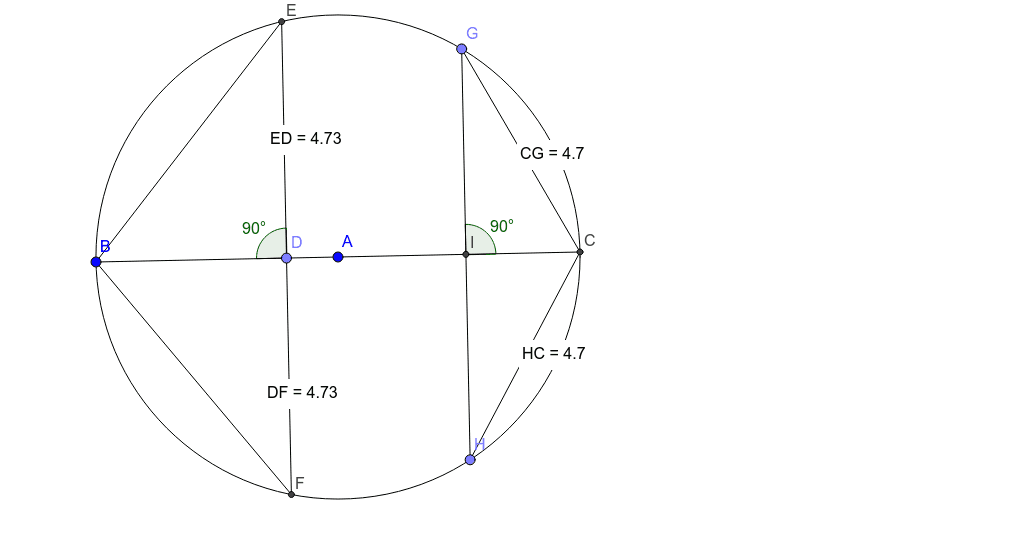
This example demonstrates the symmetry of a triangle rotating inside a circle. It involves core mathematical concepts like circle, symmetry, circumcircle, rotation, triangles, roots, and linear functions. The construction uses GeoGebra commands such as Circle, Line, Intersect, Segment, Point, OrthogonalLine, Angle, and Distance, along with objects like points A, B, C, D, E, F, and measurements like α, β. It is suitable for high school students learning geometric transformations and symmetry.
GeoGebra Commands & Parameters
Circle(A, B) → cLine(A, B) → aIntersect(c, a, 2) → CSegment(B, C) → bPoint(b) → DOrthogonalLine(D, b) → dIntersect(c, d, 2) → EIntersect(c, d, 1) → FSegment(E, F) → eAngle(E, D, B) → αDistance(E, D) → distanceEDDistance(D, F) → distanceDFSegment(B, F) → fSegment(B, E) → gDistance(E, B) → distanceEBDistance(B, F) → distanceBFPoint(c) → GPoint(c) → HSegment(G, H) → hIntersect(b, h) → IAngle(G, I, C) → βSegment(G, C) → iSegment(C, H) → jDistance(G, I) → distanceGIDistance(I, H) → distanceIHDistance(H, C) → distanceHCDistance(C, G) → distanceCG
AI Drawing Prompt Reference
Draw a circle and a triangle inside it that demonstrates rotational symmetry. Start by drawing a line segment within the circle and find its intersections with the circle. Connect these points to form a triangle. Then, draw a perpendicular line from the midpoint of the segment, intersecting the circle at two points. Connect these points and find their intersection with the original segment. Measure and label angles and distances, then connect relevant points to show the rotational symmetry.
The prompt above was compiled from the original drawing commands and is for reference only.