
Surface from a 2D Curve
Loading the math board and drawing, please wait…
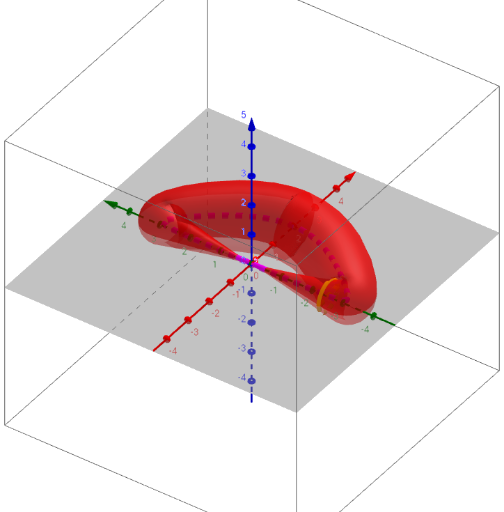
This example demonstrates how to generate a 3D surface based on a 2D curve. The core mathematical concepts involved include functions, derivatives, rotation, parametric equations, and 3D graph construction. Key GeoGebra commands and objects used in the construction are Derivative (for finding derivatives), Point (for creating points), Textfield (for text input), CurveCartesian (for defining Cartesian curves), Rotate (for rotation), Segment (for line segments), and Surface (for creating surfaces). It is suitable for high school students and mathematics enthusiasts learning spatial geometry and function visualization.
GeoGebra Commands & Parameters
Derivative(f) → f'Derivative(g) → g'Point(xAxis) → APoint(xAxis) → BTextfield(f) → ChampTexte1CurveCartesian(f(t), g(t), t, x(A), x(B)) → aTextfield(g) → ChampTexte2Rotate(C + (r(d), 0), π / 2 + atan(g'(d) / f'(d)), C) → ESegment(E, Mirror[E, C]) → hTextfield(r) → ChampTexte3CurveCartesian(f(d) + ((r(d) * sin((-atan(g'(d) / f'(d))))) * cos(t)), g(d) + ((r(d) * cos((-atan(g'(d) / f'(d))))) * cos(t)), ((e * r(d)) * sin(t)), t, 0, 6.28319) → bSurface(f(u) + ((r(u) * sin((-atan(g'(u) / f'(u))))) * cos(v)), g(u) + ((r(u) * cos((-atan(g'(u) / f'(u))))) * cos(v)), ((e * r(u)) * sin(v)), u, x(A), x(B), v, 0, 6.28319) → c
AI Drawing Prompt Reference
Create a 3D surface based on a 2D curve. First, input two functions f and g, and calculate their derivatives f' and g'. Then, create two points A and B on the x-axis. Use f and g to define a 2D curve a. Through rotation and mirroring, generate a line segment h. Finally, define a 3D surface c using f, g, and r.
The prompt above was compiled from the original drawing commands and is for reference only.