
Surface Area of a Rectangular Prism by Jason Wofsey
Loading the math board and drawing, please wait…
In collections
Surface Area and Volume
Surface Area and Volume
Surface Area and Volume
Surface Area and Volume
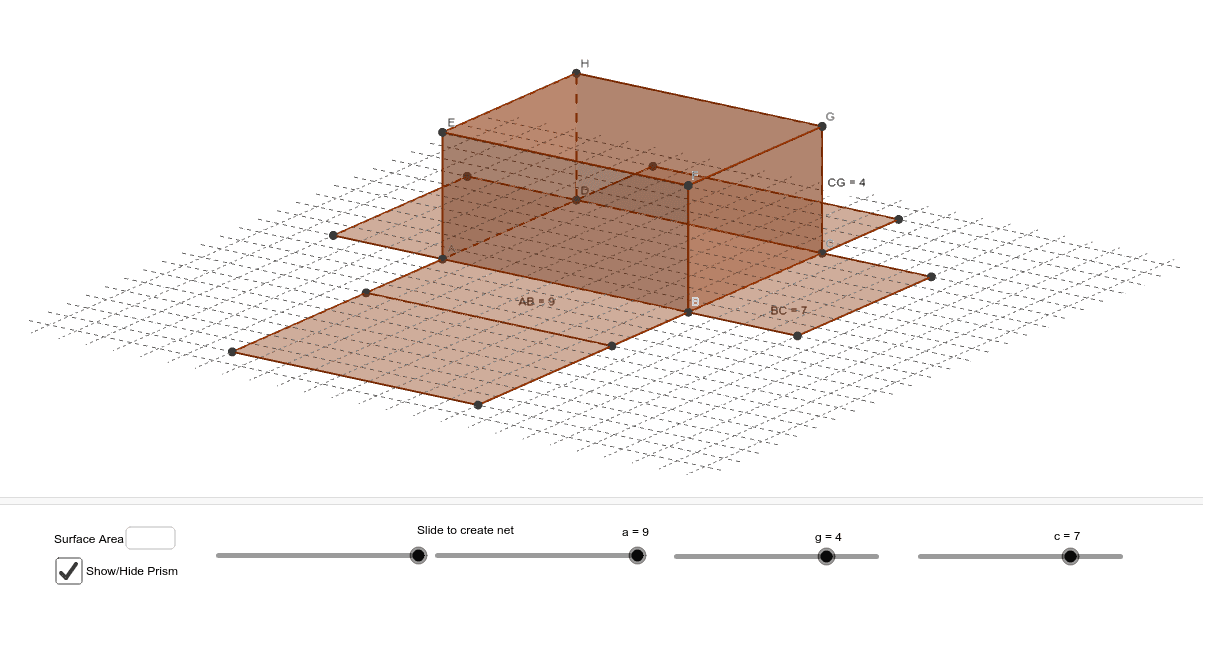
This example demonstrates how to calculate the surface area of a rectangular prism. Key math concepts include area calculation, solid geometry, and polygon properties. Construction highlights involve using GeoGebra commands/objects such as Intersect, Point, Segment, Circle, OrthogonalLine, Polygon, Prism, Textfield, Distance, and Net. It is suitable for high school students learning and understanding surface area calculations in solid geometry, as well as for visualizing related mathematical concepts.
GeoGebra Commands & Parameters
Intersect(xAxis, yAxis) → APoint(Circle[A, abs(a)]) → BSegment(A, B) → bCircle(B, c) → dOrthogonalLine(B, y = 0) → eIntersect(d, e, 2) → COrthogonalLine(C, e) → fIntersect(f, yAxis) → DPolygon(A, B, C, D) → poly1, a_1, b_1, c_1, d_1Prism(poly1, g) → h, E, edgeAE, edgeBF, edgeCG, edgeDH, edgeEF, edgeFG, edgeGH, edgeEH, F, G, H, faceABFE, faceBCGF, faceCDHG, faceADHE, faceEFGHTextfield() → inputBox1Distance(A, B) → distanceABDistance(B, C) → distanceBCDistance(C, G) → distanceCGNet(h, i) → k, I, R, S, T, U, V, faceIJKL, faceIJNM, faceJKPO, faceKLRQ, faceILST, J, faceMNUV, edgeIJ, edgeJK, edgeKL, edgeIL, edgeIM, edgeMN, edgeJN, edgeJO, edgeOP, K, edgeKP, edgeKQ, edgeQR, edgeLR, edgeLS, edgeST, edgeIT, edgeNU, edgeUV, edgeMV, L, M, N, O, P, Q
AI Drawing Prompt Reference
Draw a rectangular prism and calculate its surface area. Start by drawing a rectangle, then use this rectangle as the base to draw the prism. Label the edges and faces of the prism, and finally calculate and display the surface area.
The prompt above was compiled from the original drawing commands and is for reference only.