
Surface Area of a Cuboid
Loading the math board and drawing, please wait…
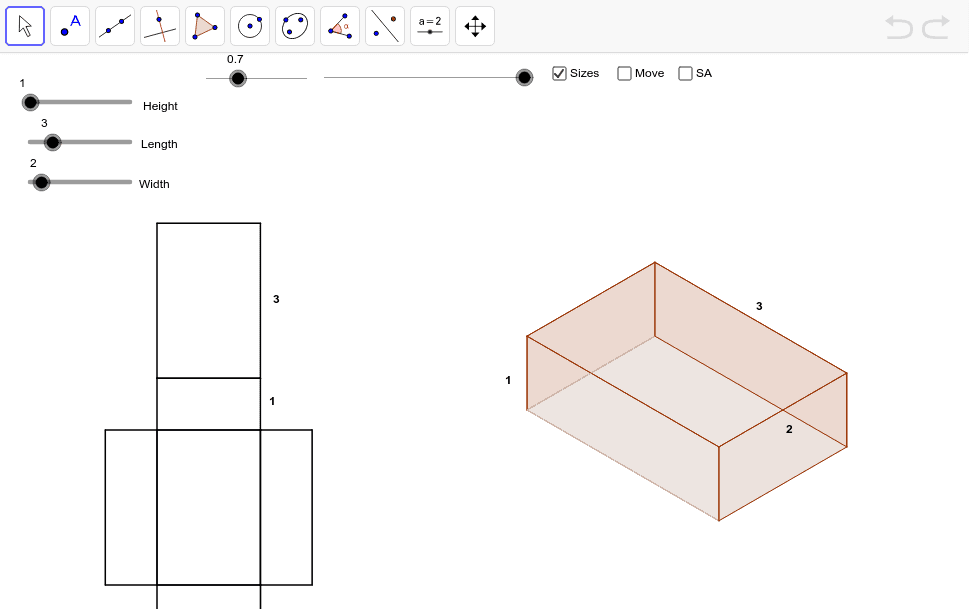
This example demonstrates the folding of a cuboid from a flat plane into a 3D shape. Key mathematical concepts include the calculation of a cuboid's surface area. It uses Vector, Polygon, If, Midpoint, Area, and other GeoGebra commands. Suitable for middle school and above students learning solid geometry.
GeoGebra Commands & Parameters
Vector(PTP_1, PB_3) → tpsbVector(PTPF_1, PTP_1) → tpf1Vector(PTP, PB_2) → tpa1Vector(PTPF, PTP) → tpfVector(PBK, PB) → bk1Vector(PBK_1, PB_1) → bk11Vector(PFT_1, PB_3) → ftb13Vector(PFT, PB_2) → fta1Vector(PSB_1, PB_3) → sbb13Vector(PSB, PB_1) → sbbVector(PSF_1, PB_2) → sfa1Vector(PSF, PB) → sfbPolygon(SF_3, SF, SF_1, SF_2) → aSideFront, a, b, c, dIf(dist < 100.0, PTPF + (dist * Length[tpf] / 100.0; Angle[tpf]), PTP + ((dist - 100.0) * Length[tpa1] / 100.0; Angle[tpa1])) → TP_3If(dist < 100.0, PTPF_1 + (dist * Length[tpf1] / 100.0; Angle[tpf1]), PTP_1 + ((dist - 100.0) * Length[tpsb] / 100.0; Angle[tpsb])) → TP_2Polygon(TP_3, TP_2, TP_1, TP) → aTop, a_1, b_1, c_1, d_1Polygon(BK_3, BK_2, BK_1, BK) → aBack, a_2, b_2, c_2, d_2Polygon(BT, BT_1, BT_2, BT_3) → aBottom, a_3, b_3, c_3, d_3Polygon(SB, SB_1, SB_2, SB_3) → aSideBack, a_4, b_4, c_4, d_4Polygon(FT, FT_1, FT_2, FT_3) → aFront, a_5, b_5, c_5, d_5Polygon(NA_2, NA, NA_1, NA_3) → planBottom, na_2, na, na_1, na_3Polygon(NA_2, NA_3, NFT_1, NFT) → planFront, na_4, na_5, nft_1, nftPolygon(NA, NSF, NSF_1, NA_2) → planSideFront, na_6, nsf, nsf_1, na_7Polygon(NA_1, NSB, NSB_1, NA_3) → planSideBack, na_8, nsb, nsb_1, na_9Polygon(NA, NBK, NBK_1, NA_1) → planBack, na_{10}, nbk, nbk_1, na_{11}Polygon(NBK, NTPT, NTPF_1, NBK_1) → planTop, nbk_2, ntpt, ntpf_1, nbk_3Midpoint(nft_1) → HnfMidpoint(ntpf_1) → HplMidpoint(nbk_1) → HpbMidpoint(b_1) → HXtsMidpoint(d_2) → HXbsMidpoint(c_5) → HXfsArea(BK_3, BK_2, BK_1, BK) → bb
AI Drawing Prompt Reference
Draw a cuboid by first showing its net and then folding it into a 3D shape. Highlight the six faces of the cuboid with different shading to represent their areas. Start with the top, front, side, back, and bottom faces in the net, then fold them to form the complete 3D cuboid, showcasing its structure.
The prompt above was compiled from the original drawing commands and is for reference only.