
Sum of Squares of Four Consecutive Prime Numbers for 2020
Loading the math board and drawing, please wait…
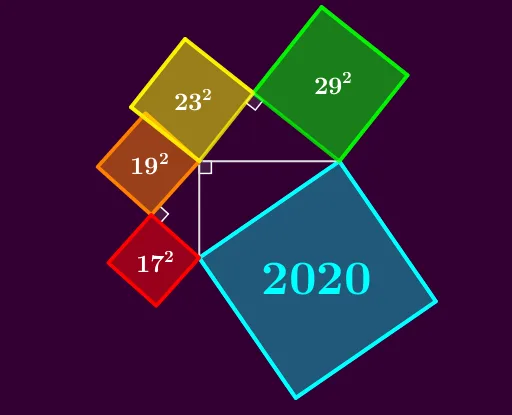
This example demonstrates that 2020 can be expressed as the sum of squares of four consecutive prime numbers. Key mathematical concepts include prime numbers, square numbers, and number theory. Using GeoGebra commands such as Circle, Intersect, and Polygon, this dynamic visualization can be created. Suitable for students at the junior high school level and above to learn about number theory and properties of numbers.
GeoGebra Commands & Parameters
Circle(O, 19) → e_1If(tt ≥ 0, f2(tt), 0) → tCircle(R, 17) → d_1Intersect(d_1, e_1, 1) → WSemicircle(M, O) → cSemicircle(O, N) → dCircle(M, 17) → eIntersect(c, e, 1) → PPolygon(R, W, 4) → poly5, g_1, h_1, i_1, j_1, Q, TPolygon(W, O, 4) → poly6, f_1, k_1, l_1, m_1, S, UCircle(O, 23) → p_1Circle(E, 29) → fIntersect(p_1, f, 1) → FPolygon(F, E, 4) → poly1, g, h, i, j, G, HPolygon(O, F, 4) → poly2, k, l, m, n, I, JAngle(O, F, E) → βRotate(M, 90°, O) → M'Polygon(N, M', 4) → poly3, p, q, r, s, K, LRotate(poly6, 90°, O) → poly6'Rotate(poly5, 90°, O) → poly5'Rotate(R, 90°, O) → R'Segment(O, E) → aSegment(O, R') → bAngle(R', O, E) → δIf(0 ≥ tt ≥ -0.5, Rotate[poly5, (f1(tt) * 90°)]) → q1If(0 ≥ tt ≥ -0.5, Rotate[poly6, (f1(tt) * 90°)]) → q2Rotate(W, 90°, O) → W'Angle(R', W', O) → γSegment(B, D) → n_1
AI Drawing Prompt Reference
Draw a circle with radius 19 centered at the origin, then create a figure showing the sum of squares of four consecutive prime numbers equals 2020. Draw circles with radii 17, 23, and 29 centered at the origin, and find their intersections with the previous circle. Use these intersection points and the origin to construct polygons, rotate the polygons, and draw angles. Finally, draw line segments from the origin to a point on the circle with radius 29, and from the origin to the rotated polygon, and calculate angles.
The prompt above was compiled from the original drawing commands and is for reference only.