
SSA Triangle Congruence Visualization
Loading the math board and drawing, please wait…
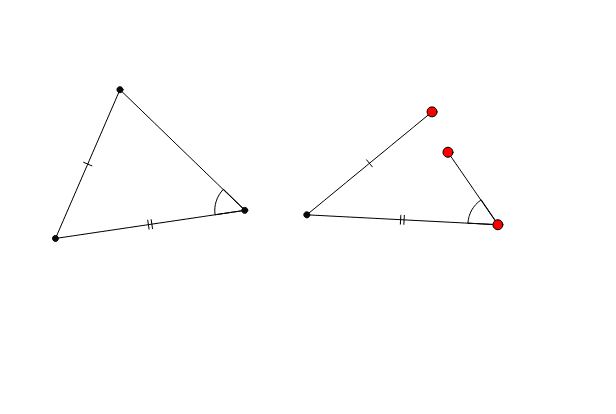
This example demonstrates triangle congruence postulates using dynamic geometry. It focuses on the Side-Side-Angle (SSA) condition to visualize and verify triangle congruence. Key mathematical concepts include triangle congruence criteria, geometric transformations, and dynamic geometry. The construction utilizes commands like Segment, Angle, Circle, Point, Rotate, Line, Polygon, and DynamicCoordinates. Suitable for high school mathematics education or for enthusiasts exploring triangle congruence properties.
GeoGebra Commands & Parameters
Segment(C, A) → cAngle(A, C, B) → αSegment(B, C) → bSegment(A, B) → aAngle(B, A, C) → βAngle(C, B, A) → γCircle(H, a) → kCircle(H, b) → pPoint(p) → IPoint(k) → JCircle(I, c) → qSegment(H, I) → lSegment(H, J) → mRotate(H, -α, I) → H'Angle(H', I, H) → δLine(H', I) → dPoint(d) → DPolygon(C, A, B) → poly1, b_1, c_1, a_1Polygon(H, J, D, I) → poly2, h, j, d_1, iDynamicCoordinates(D, If[Distance[D, J] < 0.13, x(J), x(D)], If[Distance[D, J] < 0.13, y(J), y(D)]) → ESegment(E, I) → ePolygon(H, I, E, J) → poly3, h_1, i_1, e_1, j_1If(poly1 - 1 ≤ poly2 ≤ poly1 + 1 ∧ E ≟ J, true, false) → f
AI Drawing Prompt Reference
Draw triangle ABC with AB=a, BC=b, and angle BAC=α. Construct two circles with center H and radii a and b, intersecting at points I and J. Rotate point I to I' such that angle I'HI equals angle BAC. Draw line HI', intersecting at point D. Construct triangles ABC and HJI', and adjust point D's position to make triangles ABC and HJI' as similar as possible.
The prompt above was compiled from the original drawing commands and is for reference only.