
Square Roots from 2 to 2500 - Exact Values
Loading the math board and drawing, please wait…
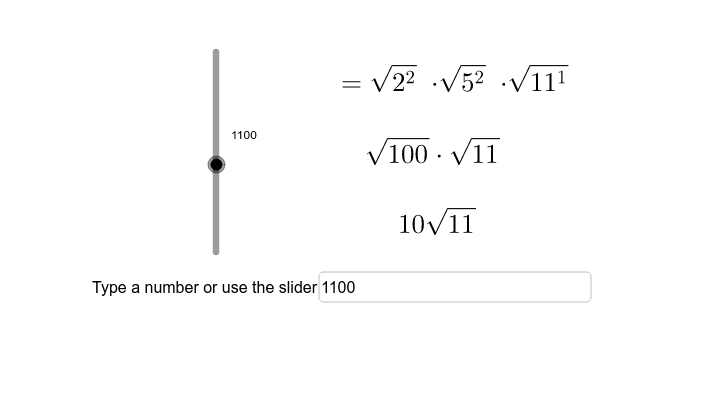
This example demonstrates how to calculate and visualize the exact square root of any number between 2 and 2500. It involves core mathematical concepts like square roots, factorization, conditional statements, and modulus operations. The construction utilizes GeoGebra commands and objects such as Factors, Element, If, Mod, and Textfield. Suitable for high school mathematics education to understand square root calculations and visualization.
GeoGebra Commands & Parameters
Factors(a) → factorsElement(factors, 1, 1) → c1Element(factors, 1, 2) → c2Element(factors, 2, 1) → d1Element(factors, 2, 2) → d2Element(factors, 3, 1) → e1Element(factors, 3, 2) → e2Element(factors, 4, 1) → f1Element(factors, 4, 2) → f2If(c1 > 1, true, false) → cIf(d1 > 1, true, false) → dIf(e1 > 1, true, false) → eIf(f1 > 1, true, false) → fMod(c2, 2) → hIf((c1 > 1) ∧ h ≟ 0, c1^(c2), c1^(c2 - 1)) → cf1If((c1 > 1) ∧ h ≟ 1, c1, 1) → cf2Mod(d2, 2) → jMod(e2, 2) → kMod(f2, 2) → lIf((d1 > 1) ∧ j ≟ 1, d1, 1) → df2If((d1 > 1) ∧ j ≟ 0, d1^(d2), d1^(d2 - 1)) → df1If((e1 > 1) ∧ k ≟ 0, e1^(e2), e1^(e2 - 1)) → ef1If((e1 > 1) ∧ k ≟ 1, e1, 1) → ef2If((f1 > 1) ∧ l ≟ 0, f1^(f2), f1^(f2 - 1)) → ff1If((f1 > 1) ∧ l ≟ 1, f1, 1) → ff2Textfield(a) → inputBox1
AI Drawing Prompt Reference
Draw a graphic showing exact square roots from 2 to 2500. Include an input box for entering numbers, and key objects like square root calculations, factorization, conditional statements, and modulus operations. The construction order starts with input, then factorization, square root computation, and visualization of results. The graphic should clearly show the calculation process and result relationships.
The prompt above was compiled from the original drawing commands and is for reference only.