
Square Construction by ADarkenedAlley
Loading the math board and drawing, please wait…
In collections
Square Translation Tessellation
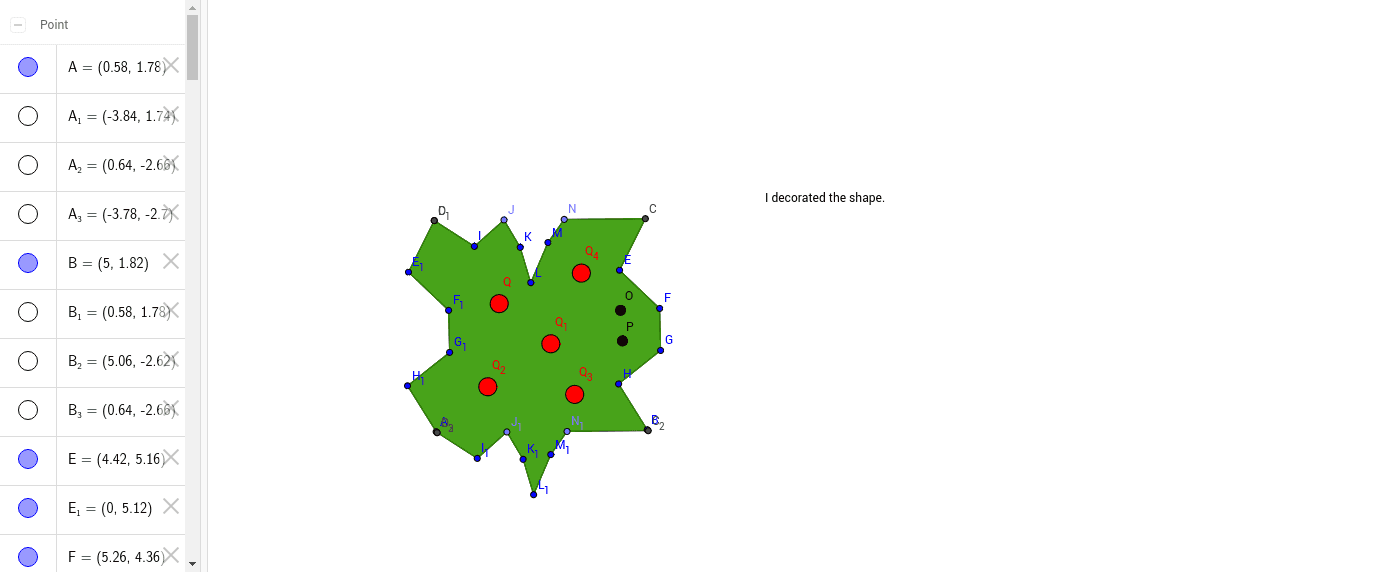
This example demonstrates how to construct a square using GeoGebra, involving core math concepts like polygons, linear equations, natural numbers, integral calculus, exponents, and roots. Key GeoGebra commands used include Polygon, Segment, and Point for geometric construction, suitable for high school mathematics education.
GeoGebra Commands & Parameters
Polygon(A, B, 4) → poly1, a, b, c, d, C, DSegment(C, E) → eSegment(E, F) → fSegment(F, G) → gSegment(G, H) → hSegment(H, B) → iPolygon(A_1, B_1, 4) → poly1_1, a_1, b_1, c_1, d_1, C_1, D_1Segment(C_1, E_1) → e_1Segment(E_1, F_1) → f_1Segment(F_1, G_1) → g_1Segment(G_1, H_1) → h_1Segment(H_1, B_1) → i_1Segment(D, I) → jPoint(c) → JSegment(I, J) → kSegment(K, J) → lSegment(K, L) → mSegment(L, M) → nPoint(c) → NSegment(M, N) → pSegment(C, N) → qPolygon(A_2, B_2, 4) → poly1_2, a_3, b_3, c_2, d_3, C_2, D_2Polygon(A_3, B_3, 4) → poly1_3, a_2, b_2, c_3, d_2, C_3, D_3Segment(D_2, I_1) → j_1Point(c_2) → J_1Segment(I_1, J_1) → k_1Segment(K_1, J_1) → l_1Segment(K_1, L_1) → m_1Segment(L_1, M_1) → n_1Point(c_2) → N_1Segment(M_1, N_1) → p_1Segment(C_2, N_1) → q_1Polygon(E, C, F_1, G_1, H_1, A, I_1, J_1, K_1, L_1, M_1, N_1, N, B, H, G, F, M, L, K, J, I, D, E_1) → poly2, e_2, e_3, f_2, g_2, h_2, a_4, i_3, j_3, k_3, l_3, m_3, c_4, n_3, b_4, h_3, g_3, f_3, n_2, m_2, l_2, k_2, j_2, i_2, d_4
AI Drawing Prompt Reference
Draw a square by connecting four points to form its sides, and show the geometric relationships inside and outside. First, construct a square, then draw lines from one vertex to the midpoint of the opposite side, and expand outward to create multiple related geometric shapes, including several squares and connecting lines, forming a complex pattern.
The prompt above was compiled from the original drawing commands and is for reference only.