
Spiral of Pythagoras
Loading the math board and drawing, please wait…
In collections
Arithmetic Operations (preGED)
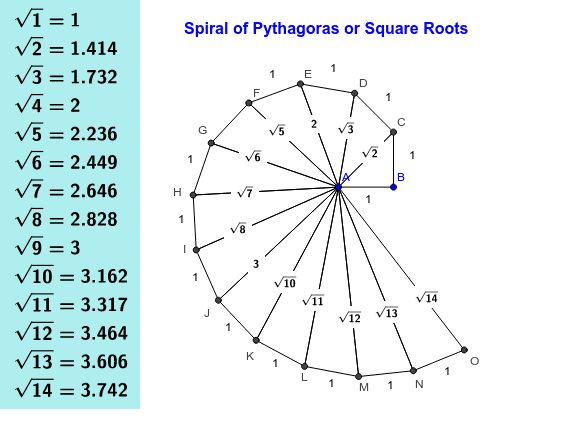
This example demonstrates the construction of the Spiral of Pythagoras, using a custom tool to create a series of right triangles. Key mathematical concepts include the Pythagorean Theorem and roots. It utilizes commands like Segment, OrthogonalLine, Circle, and Intersect in GeoGebra. Suitable for middle school and above students to learn geometric construction and the Pythagorean Theorem.
GeoGebra Commands & Parameters
Segment(A, B) → seg1OrthogonalLine(B, seg1) → line1Circle(B, 1) → cir1Intersect(cir1, line1, 2) → CSegment(B, C) → seg2Segment(A, C) → seg3Tool1(A, C) → a, c, b, D, d, eTool1(A, D) → f, g, h, E, i, jTool1(A, E) → k, p, l, F, m, nTool1(A, F) → q, r, s, G, t, a_1Tool1(A, G) → b_1, c_1, d_1, H, e_1, f_1Tool1(A, H) → g_1, h_1, i_1, I, j_1, k_1Tool1(A, I) → l_1, p_1, m_1, J, n_1, q_1Tool1(A, J) → r_1, s_1, t_1, K, a_2, b_2Tool1(A, K) → c_2, d_2, e_2, L, f_2, g_2Tool1(A, L) → h_2, k_2, i_2, M, j_2, l_2Tool1(A, M) → m_2, p_2, n_2, N, q_2, r_2Tool1(A, N) → s_2, t_2, a_3, O, b_3, c_3SurdText(a) → a_{text}SurdText(e) → e_{text}SurdText(j) → j_{text}SurdText(n) → n_{text}SurdText(a_1) → n_{1text}SurdText(f_1) → f_{1text}SurdText(q_1) → q_{1text}SurdText(b_2) → b_{2text}SurdText(g_2) → g_{2text}SurdText(r_2) → r_{2text}SurdText(c_3) → c_{3text}TableText({Sequence["\sqrt{" + (k) + "} = " + (sqrt(k)), k, 1, 14]}, "v") → table1
AI Drawing Prompt Reference
Start with a segment. At one endpoint, draw a perpendicular line and mark a point one unit away, then connect it to the other endpoint to form the first right triangle. Repeat this process: for each new hypotenuse, construct a perpendicular at its outer endpoint, mark a unit point, and connect back to the common starting vertex, creating a spiral of right triangles. Each hypotenuse length corresponds to sqrt(2), sqrt(3), sqrt(4), etc., and these radical values are displayed as text near the corresponding sides. Additionally, include a table listing the equalities from sqrt(1) to sqrt(14).
The prompt above was compiled from the original drawing commands and is for reference only.