
Spherical Coordinates Demonstration by 古徳純一
Loading the math board and drawing, please wait…
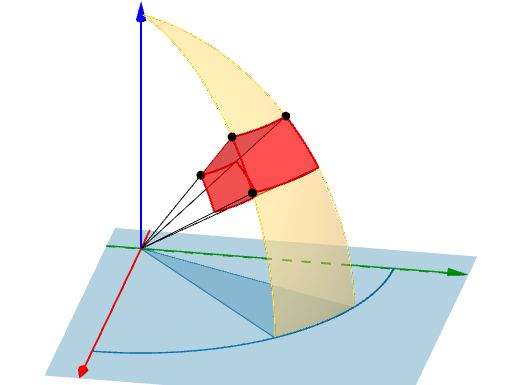
This example demonstrates how to draw a brick shape in spherical coordinates. The core mathematical concepts involved include the definition and application of spherical coordinates. Key construction points involve using GeoGebra commands and objects such as PointIn, If, CurveCartesian, Point, Surface, Intersect, Segment, CircumcircleArc, and CircumcircleSector to construct a 3D shape. Suitable for high school students and above to learn about solid geometry and spherical coordinates.
GeoGebra Commands & Parameters
PointIn(o) → AIf(x(A) > 0, atan(y(A) / x(A)), atan(y(A) / x(A)) + π) → α_1CurveCartesian((cos(α_1 + t) * sin(β_1)), (sin(α_1 + t) * sin(β_1)), cos(β_1), t, 0, 3.141592653589793) → cPoint(c) → BIf(x(B) > 0, atan(y(B) / x(B)), atan(y(B) / x(B)) + π) → α_2CurveCartesian((cos(α_1) * sin(β_1 + t)), (sin(α_1) * sin(β_1 + t)), cos(β_1 + t), t, 0, π - β_1) → dPoint(d) → CCurveCartesian((cos(α_1 + t) * sin(β_1)), (sin(α_1 + t) * sin(β_1)), cos(β_1), t, 0, Δα) → eSurface((sin(u) * cos(t)), (sin(u) * sin(t)), cos(u), u, β_1, β_2, t, α_1, α_2) → aIntersect(yAxis, zAxis) → ESegment(A, E) → fPoint(f) → FSegment(E, F) → hSegment(F, A) → iSurface(((h * sin(u)) * cos(t)), ((h * sin(u)) * sin(t)), (h * cos(u)), u, β_1, β_2, t, α_1, α_2) → bSurface(((t * sin(β_1)) * cos(u)), ((t * sin(β_1)) * sin(u)), (t * cos(β_1)), u, α_1, α_2, t, h, 1) → jSurface(((t * sin(β_2)) * cos(u)), ((t * sin(β_2)) * sin(u)), (t * cos(β_2)), u, α_1, α_2, t, h, 1) → kSurface(((t * sin(u)) * cos(α_1)), ((t * sin(u)) * sin(α_1)), (t * cos(u)), u, β_1, β_2, t, h, 1) → lSurface(((t * sin(u)) * cos(α_2)), ((t * sin(u)) * sin(α_2)), (t * cos(u)), u, β_1, β_2, t, h, 1) → mCurveCartesian((cos(α_1 + t) * sin(β_2)), (sin(α_1 + t) * sin(β_2)), cos(β_2), t, 0, Δα) → gCurveCartesian((cos(α_1) * sin(β_1 + t)), (sin(α_1) * sin(β_1 + t)), cos(β_1 + t), t, 0, Δβ) → nCurveCartesian((cos(α_2) * sin(β_1 + t)), (sin(α_2) * sin(β_1 + t)), cos(β_1 + t), t, 0, Δβ) → pSegment(B, B') → qSegment(C, C') → rSegment(D, D') → sCurveCartesian(((h * cos(α_1 + t)) * sin(β_1)), ((h * sin(α_1 + t)) * sin(β_1)), (h * cos(β_1)), t, 0, Δα) → tCurveCartesian(((h * cos(α_1 + t)) * sin(β_2)), ((h * sin(α_1 + t)) * sin(β_2)), (h * cos(β_2)), t, 0, Δα) → uCurveCartesian(((h * cos(α_1)) * sin(β_1 + t)), ((h * sin(α_1)) * sin(β_1 + t)), (h * cos(β_1 + t)), t, 0, Δβ) → vCurveCartesian(((h * cos(α_2)) * sin(β_1 + t)), ((h * sin(α_2)) * sin(β_1 + t)), (h * cos(β_1 + t)), t, 0, Δβ) → wCurveCartesian((cos(α_1 + t) * sin(β_1)), (sin(α_1 + t) * sin(β_1)), cos(β_1), t, 0, 6.283185307179586) → a_1CurveCartesian((cos(α_1 + t) * sin(β_2)), (sin(α_1 + t) * sin(β_2)), cos(β_2), t, 0, 6.28319) → b_1CurveCartesian((cos(α_1) * sin(t)), (sin(α_1) * sin(t)), cos(t), t, 0, 3.141592653589793) → c_1CurveCartesian((cos(α_2) * sin(t)), (sin(α_2) * sin(t)), cos(t), t, 0, 3.141592653589793) → d_1Segment(B, E) → f_1Segment(C, E) → g_1Segment(D, E) → h_1CircumcircleArc(H, C, G) → k_1CircumcircleArc(H, B, G) → p_1Segment(I, E) → i_1Segment(J, E) → j_1Surface((sin(u) * cos(t)), (sin(u) * sin(t)), cos(u), u, 0, β_1, t, α_1, α_2) → m_1Surface(((t * sin(u)) * cos(α_2)), ((t * sin(u)) * sin(α_2)), (t * cos(u)), u, β_1, β_2, t, 0, h) → n_1Surface(((t * sin(u)) * cos(α_2)), ((t * sin(u)) * sin(α_2)), (t * cos(u)), u, 0, β_1, t, 0, 1) → o_1Surface(((t * sin(u)) * cos(α_2)), ((t * sin(u)) * sin(α_2)), (t * cos(u)), u, β_2, 1.5707963267948966, t, 0, 1) → q_1Surface(((t * sin(u)) * cos(α_1)), ((t * sin(u)) * sin(α_1)), (t * cos(u)), u, 0, β_1, t, 0, 1) → r_1Surface(((t * sin(u)) * cos(α_1)), ((t * sin(u)) * sin(α_1)), (t * cos(u)), u, β_2, 1.5708, t, 0, 1) → s_1Surface(((t * sin(u)) * cos(α_1)), ((t * sin(u)) * sin(α_1)), (t * cos(u)), u, β_1, β_2, t, 0, h) → t_1CurveCartesian(cos(t), sin(t), 0, t, 0, 1.5707963267948966) → e_1Surface((sin(u) * cos(t)), (sin(u) * sin(t)), cos(u), u, β_2, 3.141592653589793, t, α_1, α_2) → l_1Surface((t * cos(α_1)), (t * sin(α_1)), u, t, 0, 1, u, -1, 1) → u_1Surface((t * cos(α_2)), (t * sin(α_2)), u, t, 0, 1, u, -1, 1) → v_1CircumcircleSector(I, K, J) → c_2
AI Drawing Prompt Reference
Draw a brick shape using spherical coordinates to demonstrate the definition and application of spherical coordinates. Start by plotting curves generated by spherical coordinate parametric equations, then use these curves to construct a 3D brick shape. Key steps involve determining point positions, forming the faces of the brick with curves and surfaces, and refining the shape through intersection and connection operations, suitable for learning solid geometry and spherical coordinates.
The prompt above was compiled from the original drawing commands and is for reference only.