
Special Right Triangles by Jacqui Wagner
Loading the math board and drawing, please wait…
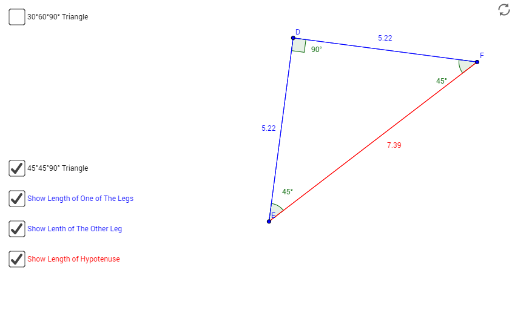
This example demonstrates the properties of special right triangles, involving key mathematical concepts such as right triangles, trigonometry, and geometric construction. Using GeoGebra commands like Segment, Rotate, Angle, etc., it dynamically shows the relationships between the sides and angles of right triangles. Suitable for middle and high school students to learn about right triangles.
GeoGebra Commands & Parameters
Segment(A, B) → aRotate(B, 90°, A) → B'Angle(B, A, B') → αRay(A, B') → bDilate(B', 1.7320508, A) → CSegment(C, A) → cSegment(C, B) → dAngle(A, C, B) → βAngle(C, B, A) → γRotate(E, 90°, D) → FAngle(E, D, F) → δSegment(E, D) → fSegment(D, F) → gSegment(F, E) → hAngle(D, F, E) → εAngle(F, E, D) → ζSegment(C, A) → jSegment(A, B) → kSegment(B, C) → lSegment(D, E) → mSegment(E, F) → nSegment(F, D) → p
AI Drawing Prompt Reference
Draw a right triangle with a 30-degree and a 60-degree angle. Start by drawing the right angle side AB, then rotate point B 90 degrees to get B', forming angle α. Next, draw the hypotenuse AC and BC, as well as angles β and γ.
The prompt above was compiled from the original drawing commands and is for reference only.