
Special Right Triangles-45-45-90 and 30-60-90
Loading the math board and drawing, please wait…
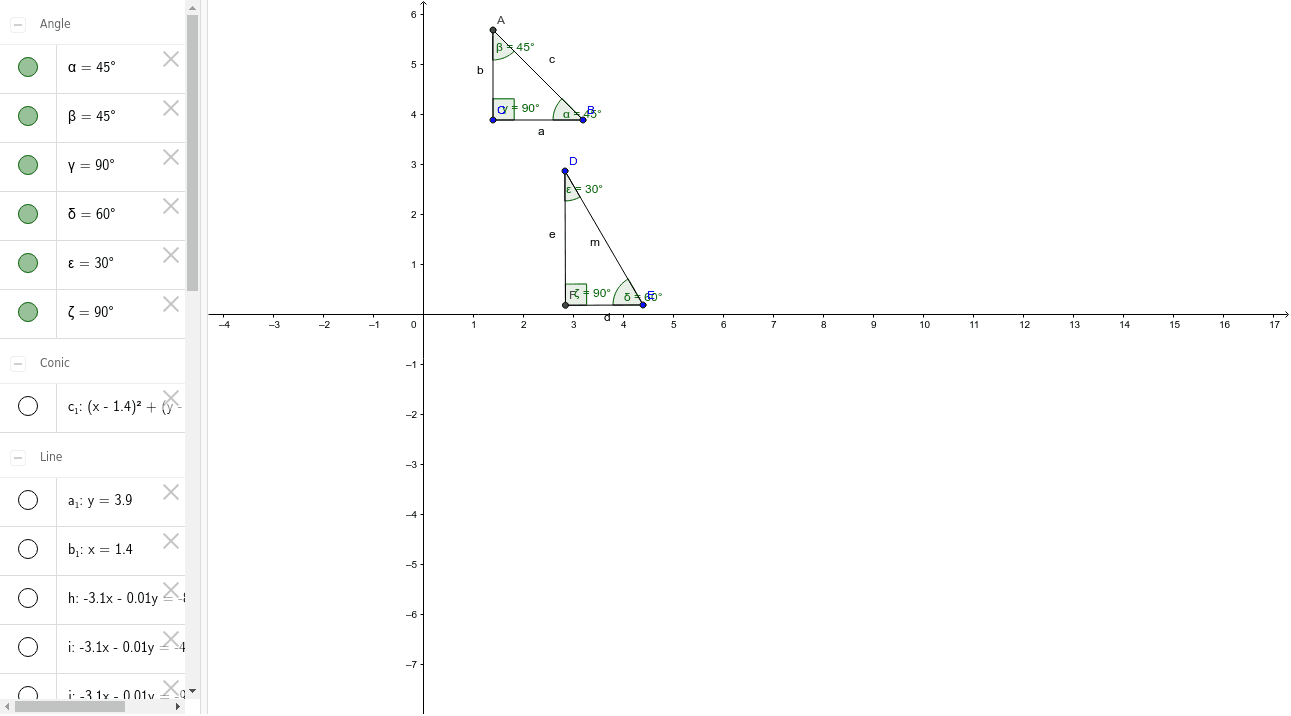
This example demonstrates the properties and constructions of two special right triangles: the 45-45-90 and 30-60-90 triangles. It involves core math concepts such as isosceles right triangles, side length ratios for 30-60-90 triangles, and trigonometric functions. The construction uses GeoGebra commands like Circle, Line, OrthogonalLine, Intersect, Segment, Angle, and Rotate. It is suitable for high school students to explore geometric properties and calculations of these special triangles.
GeoGebra Commands & Parameters
Circle(C, B) → c_1Line(C, B) → a_1OrthogonalLine(C, a_1) → b_1Intersect(c_1, b_1, 2) → ASegment(A, C) → bSegment(B, A) → cSegment(C, B) → aAngle(A, B, C) → αAngle(C, A, B) → βAngle(B, C, A) → γRotate(D, 60*°, E) → D'Angle(D, E, D') → δSegment(D', E) → gOrthogonalLine(D, g) → hOrthogonalLine(D', g) → iOrthogonalLine(F_1, g) → jSegment(D, F_1) → kSegment(E, F_1) → lSegment(D, E) → mOrthogonalLine(D, g) → nIntersect(n, g) → FAngle(F, D, E) → εSegment(D, F) → eSegment(F, E) → dAngle(E, F, D) → ζ
AI Drawing Prompt Reference
Draw a diagram showing two special right triangles: a 45-45-90 isosceles right triangle and a 30-60-90 right triangle. Start by drawing a circle and a line, then find their intersection points to form two triangles. Rotate one point around another by 60 degrees, draw new segments, and use orthogonal lines to construct additional segments and angles. The final diagram should clearly illustrate the geometric properties and relationships of the two special right triangles.
The prompt above was compiled from the original drawing commands and is for reference only.