
Solving Simple Sine Equations
Loading the math board and drawing, please wait…
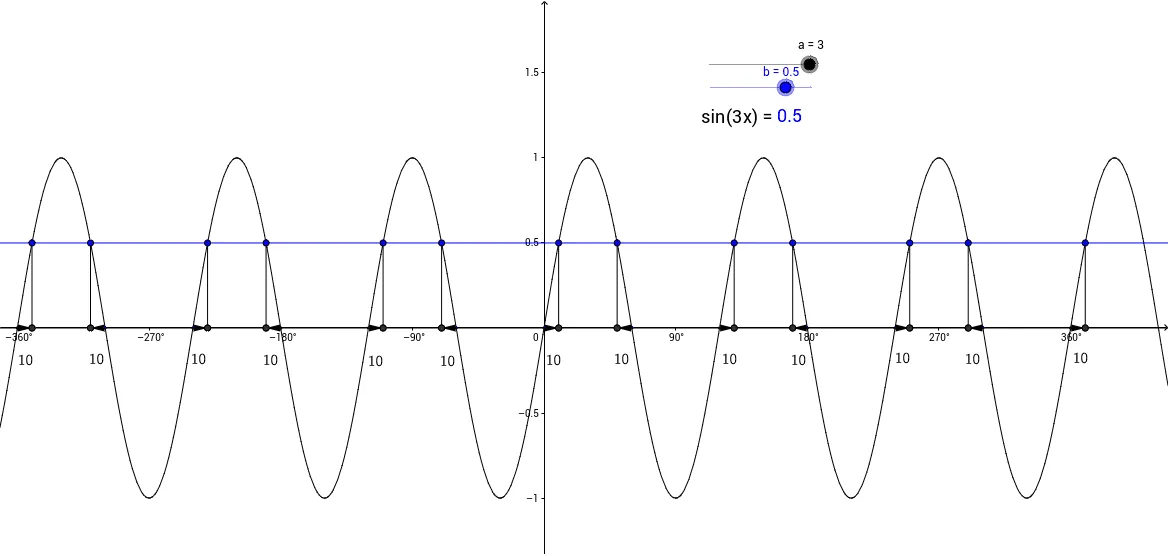
This example shows how to solve simple sine equations by changing slider values. Users can dynamically adjust parameters to see how the sine graph intersects with a given line, and use geometric constructions involving distances and vectors to find the equation's solutions. The core mathematical concepts include the graphical properties of sine functions, geometric interpretation of equation roots, orthogonal relationships between vectors and lines, and distance and intersection calculations. The construction employs GeoGebra commands such as OrthogonalLine to draw perpendiculars, Intersect to locate intersections, Segment to create line segments, Vector to represent direction, and Distance to measure lengths, all controlled by sliders for variables a, b, c, etc. It is suitable for high‑school students learning trigonometric equation solving and for university courses covering elementary mathematical methods.
GeoGebra Commands & Parameters
OrthogonalLine(K, c) → dOrthogonalLine(L, c) → eOrthogonalLine(J, c) → gOrthogonalLine(I, c) → hOrthogonalLine(H, c) → iOrthogonalLine(G, c) → jOrthogonalLine(A, c) → kOrthogonalLine(E, c) → lOrthogonalLine(D, c) → mOrthogonalLine(F, c) → nOrthogonalLine(C, c) → pOrthogonalLine(B, c) → qIntersect(d, r) → MIntersect(e, r) → NIntersect(g, r) → OIntersect(h, r) → PIntersect(i, r) → QIntersect(j, r) → RIntersect(k, r) → SIntersect(l, r) → TIntersect(m, r) → UIntersect(n, r) → VIntersect(p, r) → WIntersect(q, r) → ZSegment(K, M) → sSegment(L, N) → tSegment(J, O) → a_1Segment(I, P) → b_1Segment(H, Q) → c_1Segment(G, R) → d_1Segment(A, S) → e_1Segment(E, T) → f_1Segment(D, U) → g_1Segment(F, V) → h_1Segment(C, W) → i_1Segment(B, Z) → j_1OrthogonalLine(A_1, c) → k_1Intersect(r, k_1) → B_1Segment(A_1, B_1) → l_1Vector(C_1, N_1) → uVector(E_1, Q_1) → vVector(F_1, R_1) → wVector(G_1, S_1) → zVector(H_1, T_1) → u_1Vector(I_1, U_1) → v_1Vector(J_1, V_1) → w_1Vector(P_1, W_1) → z_1Vector(K_1, Z_1) → m_1Vector(L_1, A_2) → n_1Vector(M_1, B_2) → p_1Vector(D_1, C_2) → q_1Vector(O_1, D_2) → r_1Distance(C_1, N_1) → distanceC1N1Distance(Q_1, E_1) → distanceQ1E1Distance(F_1, R_1) → distanceF1R1Distance(S_1, G_1) → distanceS1G1Distance(H_1, T_1) → distanceH1T1Distance(U_1, I_1) → distanceU1I1Distance(J_1, V_1) → distanceJ1V1Distance(W_1, P_1) → distanceW1P1Distance(K_1, Z_1) → distanceK1Z1Distance(A_2, L_1) → distanceA2L1Distance(M_1, B_2) → distanceM1B2Distance(C_2, D_1) → distanceC2D1Distance(O_1, D_2) → distanceO1D2