
Solving Equations with Inverse Operations
Loading the math board and drawing, please wait…
In collections
Gleichungen lösen mit Umkehroperationen
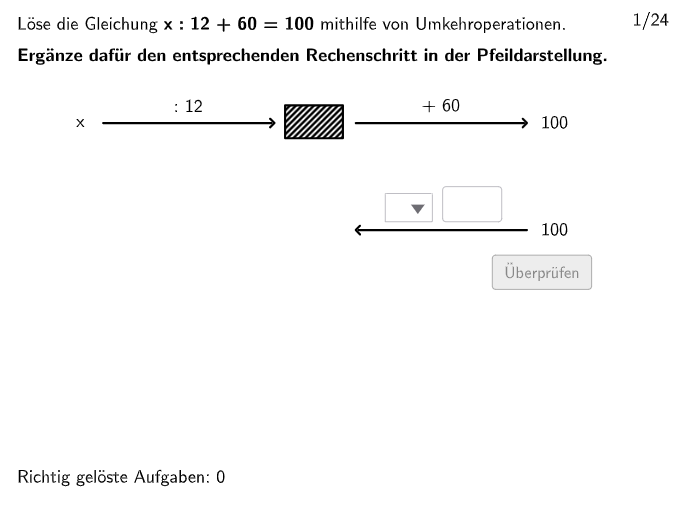
This example demonstrates how to use inverse operations to solve linear equations. Students can adjust the variable values to observe the changes in the equation and learn how to use inverse operations to solve the equation. The key mathematical concepts involved are linear equations, inverse operations, and algebraic operations. The construction points include using GeoGebra's Shuffle, Join, Insert, etc. commands to build the equation and solve the equation process. Suitable for middle school math, especially for 5-6 grade students.
GeoGebra Commands & Parameters
Shuffle(1…6) → Type1List, {3, 6, 4, 5, 1, 2}Shuffle(7…12) → Type2List, {10, 9, 8, 11, 7, 12}Shuffle(19…24) → Type4List, {24, 20, 19, 23, 21, 22}Join({{3}, Shuffle[{1, 2, 4}]}) → Round1Insert(Last[Round1], Shuffle[Take[Round1, 1, 3]], RandomElement[2…4]) → Round2Insert(Last[Round2], Shuffle[Take[Round2, 1, 3]], RandomElement[2…4]) → Round3Insert(Last[Round3], Shuffle[Take[Round3, 1, 3]], RandomElement[2…4]) → Round4Insert(Last[Round4], Shuffle[Take[Round4, 1, 3]], RandomElement[2…4]) → Round5Insert(Last[Round5], Shuffle[Take[Round5, 1, 3]], RandomElement[2…4]) → Round6Join({{18}, Shuffle[13…17]}) → Type3ListJoin({Round1, Round2, Round3, Round4, Round5, Round6}) → TypeListSequence(Element[If[TypeList(k) ≟ 1, Type1List, TypeList(k) ≟ 2, Type2List, TypeList(k) ≟ 3, Type3List, Type4List], floor(k / 5) + 1], k, 1, 24) → ReihenfolgeJoin({Sequence[3, k, 1, 12], Sequence[4, k, 1, 12]}) → TaskSignList1SelectedIndex(dropdown1) → indexdd1Sequence(If[TaskSignList1(k) ≟ 1, 2, TaskSignList1(k) ≟ 2, 1, TaskSignList1(k) ≟ 3, 4, TaskSignList1(k) ≟ 4, 3], k, 1, 24) → UTaskSignList1Sequence(ParseToNumber[((((Text[Number1List(k)] * "") * Element[SignList, TaskSignList1(k)]) * "") * Text[Number2List(k)])], k, 1, 24) → Number3ListJoin({Sequence[1, k, 1, 6], Sequence[2, k, 1, 6], Sequence[1, k, 1, 6], Sequence[2, k, 1, 6]}) → TaskSignList2SelectedIndex(dropdown3) → indexdd3Sequence(If[TaskSignList2(k) ≟ 1, 2, TaskSignList2(k) ≟ 2, 1, TaskSignList2(k) ≟ 3, 4, TaskSignList2(k) ≟ 4, 3], k, 1, 24) → UTaskSignList2Textfield(input4) → InputBox4Textfield(input3) → InputBox3Textfield(input2) → InputBox2Textfield(input1) → InputBox1Shuffle(1…numberOfQuestions) → randomQuestions, {6, 8, 22, 13, 5, 16, 2, 9, 7, 1, 3, 24, 15, 21, 23, 19, 4, 10, 12, 20, 18, 14, 11, 17}Textfield(input) → inputBoxElement(randomQuestions, Mod[questionCount - 1, Length[randomQuestions]] + 1) → randomQuestionElement(SignTextList, TaskSignList1(question)) → txtSignMidpoint(Corner[txt02, 3], Corner[txt02, 2] + (3.5, 0.05)) → PosSeg2Segment(PosSeg2, PosSeg2 + (segLength, 0)) → seg2Sequence(ParseToNumber[((((Text[Number3List(k)] * "") * Element[SignList, TaskSignList2(k)]) * "") * Text[Number4List(k)])], k, 1, 24) → Number5ListInvert(pixMat) → invPixMatSelectedIndex(dropdown2) → indexdd2Segment(PosSegSol, PosSegSol + (segLength / 2, 0)) → segSolText((((("\textsf{" * SignTextList(UTaskSignList1(question))) * " ") * ReplaceAll[Text[number2], ".", ","]) * "}"), Midpoint[segSol], false, true, 0, 1) → txtSolution3Segment(PosSeg1, PosSeg1 + (segLength, 0)) → seg1Text((((("\textsf{" * SignTextList(TaskSignList1(question))) * " ") * ReplaceAll[Text[number2], ".", ","]) * "}"), Midpoint[seg1], false, true, 0, 1) → txt03Segment(PosSeg21, PosSeg21 + (segLength, 0)) → seg21Segment(PosSeg11, PosSeg11 + (segLength, 0)) → seg11Text((((("\textsf{" * SignTextList(TaskSignList2(question))) * " ") * ReplaceAll[Text[number4], ".", ","]) * "}"), Midpoint[seg11], false, true, 0, 1) → txt06Segment(PosSegSol2, PosSegSol2 + (segLength / 2, 0)) → segSol2Text((((("\textsf{" * SignTextList(UTaskSignList2(question))) * " ") * ReplaceAll[Text[number4], ".", ","]) * "}"), Midpoint[segSol2], false, true, 0, 1) → txtSolution4SelectedIndex(dropdown4) → indexdd4Text(txtSolution6, Midpoint[Corner[txtSolution2, 1], Corner[txtSolution2, 2]] + (0, -1.35), false, true, 0, 0) → txtSolution7
AI Drawing Prompt Reference
Draw a process of solving linear equations with six steps. First, generate six random numbers, then create two linear equations based on these numbers. Next, use inverse operations to solve the equations step by step, showing each step on the graph. Finally, display the final solution of the equation.
The prompt above was compiled from the original drawing commands and is for reference only.