
Slide 4
Loading the math board and drawing, please wait…
In collections
Phebe Tanner Tessellation Rotation
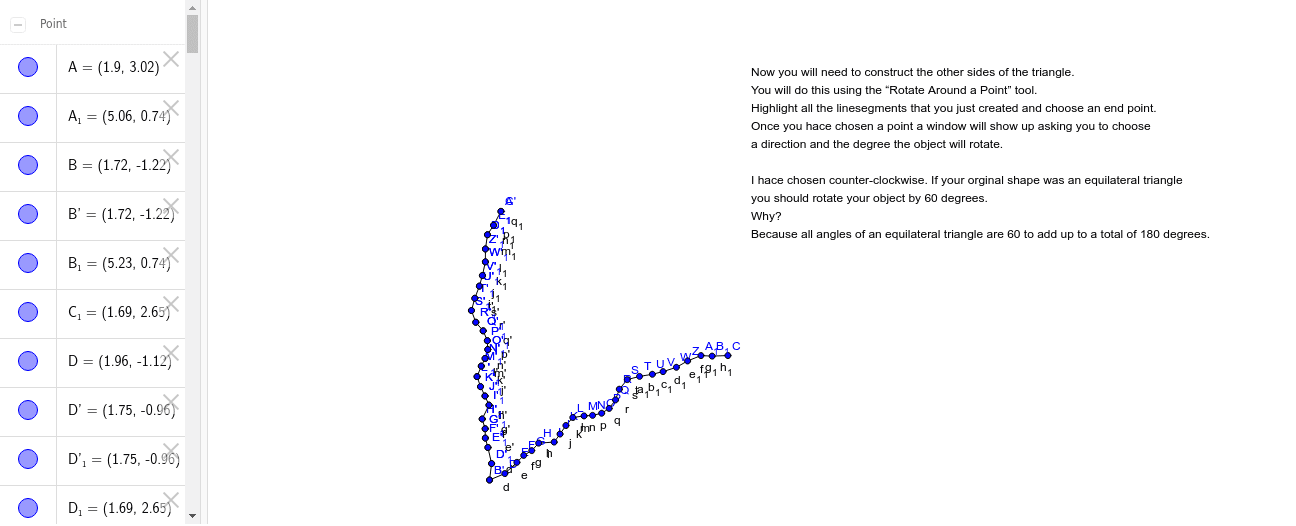
This example demonstrates how to use GeoGebra to draw vectors and polygons. It involves key mathematical concepts such as vector and polygon construction. By using commands like Polygon, Segment, Rotate, dynamic geometric shapes can be created. Suitable for secondary school geometry education.
GeoGebra Commands & Parameters
Polygon(A, B, 3) → poly1, a, b, c, CSegment(B, D) → dSegment(D, E) → eSegment(E, F) → fSegment(F, G) → gSegment(G, H) → hSegment(H, I) → iSegment(I, J) → jSegment(J, K) → kSegment(K, L) → lSegment(L, M) → mSegment(M, N) → nSegment(N, O) → pSegment(O, P) → qSegment(P, Q) → rSegment(Q, R) → sSegment(R, S) → tSegment(S, T) → a_1Segment(T, U) → b_1Segment(U, V) → c_1Segment(V, W) → d_1Segment(W, Z) → e_1Segment(Z, A_1) → f_1Segment(A_1, B_1) → g_1Segment(B_1, C) → h_1Rotate(B, 60*°, B) → B'Rotate(D, 60*°, B) → D'Segment(B', D') → d'Rotate(D, 60*°, B) → D'_1Rotate(E, 60*°, B) → E'Segment(D'_1, E') → e'Rotate(E, 60*°, B) → E'_1Rotate(F, 60*°, B) → F'Segment(E'_1, F') → f'Rotate(F, 60*°, B) → F'_1Rotate(G, 60*°, B) → G'Segment(F'_1, G') → g'Rotate(G, 60*°, B) → G'_1Rotate(H, 60*°, B) → H'Segment(G'_1, H') → h'Rotate(H, 60*°, B) → H'_1Rotate(I, 60*°, B) → I'Segment(H'_1, I') → i'Rotate(I, 60*°, B) → I'_1Rotate(J, 60*°, B) → J'Segment(I'_1, J') → j'Rotate(J, 60*°, B) → J'_1Rotate(K, 60*°, B) → K'Segment(J'_1, K') → k'Rotate(K, 60*°, B) → K'_1Rotate(L, 60*°, B) → L'Segment(K'_1, L') → l'Rotate(L, 60*°, B) → L'_1Rotate(M, 60*°, B) → M'Segment(L'_1, M') → m'Rotate(M, 60*°, B) → M'_1Rotate(N, 60*°, B) → N'Segment(M'_1, N') → n'Rotate(N, 60*°, B) → N'_1Rotate(O, 60*°, B) → O'Segment(N'_1, O') → p'Rotate(O, 60*°, B) → O'_1Rotate(P, 60*°, B) → P'Segment(O'_1, P') → q'Rotate(P, 60*°, B) → P'_1Rotate(Q, 60*°, B) → Q'Segment(P'_1, Q') → r'Rotate(Q, 60*°, B) → Q'_1Rotate(R, 60*°, B) → R'Segment(Q'_1, R') → s'Rotate(R, 60*°, B) → R'_1Rotate(S, 60*°, B) → S'Segment(R'_1, S') → t'Rotate(S, 60*°, B) → S'_1Rotate(T, 60*°, B) → T'Segment(S'_1, T') → i_1Rotate(T, 60*°, B) → T'_1Rotate(U, 60*°, B) → U'Segment(T'_1, U') → j_1Rotate(U, 60*°, B) → U'_1Rotate(V, 60*°, B) → V'Segment(U'_1, V') → k_1Rotate(V, 60*°, B) → V'_1Rotate(W, 60*°, B) → W'Segment(V'_1, W') → l_1Rotate(W, 60*°, B) → W'_1Rotate(Z, 60*°, B) → Z'Segment(W'_1, Z') → m_1Rotate(Z, 60*°, B) → Z'_1Rotate(A_1, 60*°, B) → C_1Segment(Z'_1, C_1) → n_1Rotate(A_1, 60*°, B) → D_1Rotate(B_1, 60*°, B) → E_1Segment(D_1, E_1) → p_1Rotate(B_1, 60*°, B) → F_1Rotate(C, 60*°, B) → C'Segment(F_1, C') → q_1
AI Drawing Prompt Reference
Draw a 12-sided polygon by rotating each vertex 60 degrees. Start with a hexagon, then rotate each vertex 60 degrees around a fixed point to generate new vertices, connect these new vertices to form another hexagon, and repeat this process until all vertices are generated and connected.
The prompt above was compiled from the original drawing commands and is for reference only.