
Slicing a Regular Polygon
Loading the math board and drawing, please wait…
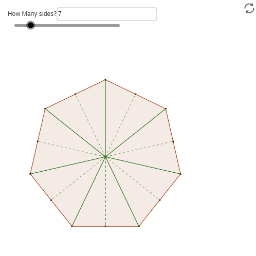
This example demonstrates the slicing of a regular polygon, drawing its radii and apothems. It helps discover how to find the area of a regular polygon using triangles. Utilizes Sequence, Polygon, Append commands, suitable for middle school and above students learning geometry.
GeoGebra Commands & Parameters
Textfield(n) → numSidesBoxSequence(O + Vector[((r * sin(((2 * k) * π / n))), (r * cos(((2 * k) * π / n))))], k, 0, n - 1) → pointsPolygon(points) → polySequence(Segment[O, points(k)], k, 1, n) → radiiAppend(Sequence[Midpoint[points(k), points(k + 1)], k, 1, n - 1], Midpoint[points(1), points(n)]) → midpointsSequence(Segment[O, midpoints(k)], k, 1, n) → apothems
AI Drawing Prompt Reference
Draw a regular polygon with a variable number of sides, centered at the origin. Generate its vertices on a circle of fixed radius, then connect them in order to form the polygon. From the center, draw line segments to each vertex (radii), and also to the midpoint of each side (apothems). These segments divide the polygon into congruent triangles, illustrating how its area can be computed.
The prompt above was compiled from the original drawing commands and is for reference only.