
Sine Rule, Cosine Rule & Area Practice
Loading the math board and drawing, please wait…
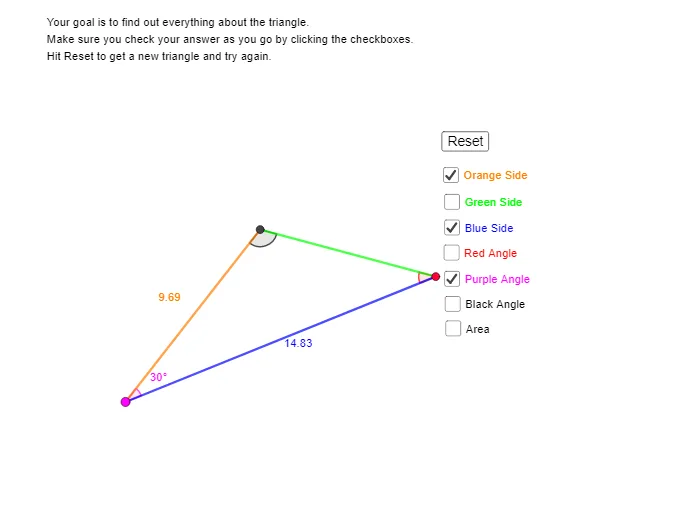
① This interactive GeoGebra practice tool demonstrates the sine rule, cosine rule, and area formula for triangles. ② Core math concepts include the sine rule (a/sinA = b/sinB = c/sinC), cosine rule (c² = a² + b² - 2ab·cosC), and triangle area formula (S = ½ab·sinC), along with relationships between sides, angles, and area. ③ Construction details: from the summary, it uses GeoGebra commands such as Line, Rotate, Angle, Segment, Ray, Intersect, and Polygon, creating multiple points (A, B, X, Y, Z), angles (α, β, γ, etc.), segments, and polygons, with interactive buttons (button1) and text objects (text1, text2) for practice. ④ This is suitable for high school students (grades 10-12) learning trigonometry and triangle solving, and for teachers to demonstrate these theorems dynamically in class or for self-study.
GeoGebra Commands & Parameters
Line(A, xAxis) → fRotate(A, α, Z) → YAngle(A, Z, Y) → γSegment(Z, Y) → gRotate(Y, δ, Z) → A''Angle(Y, Z, A'') → εRotate(Z, (-β), Y) → B'Angle(B', Y, Z) → ζRay(Z, A'') → hRay(Y, B') → iIntersect(i, h) → XSegment(Z, X) → jSegment(X, Y) → kAngle(Z, X, Y) → ηPolygon(Z, X, Y) → t1, y_1, z_1, x_1
AI Drawing Prompt Reference
Draw a triangle ABC with points A, B, and C as vertices. Use the sine and cosine laws to calculate angles and side lengths. Create auxiliary lines and points through rotation and angle measurement, and finally form a triangle to calculate its area.
The prompt above was compiled from the original drawing commands and is for reference only.