
Sine Law Tester by David Peterson
Loading the math board and drawing, please wait…
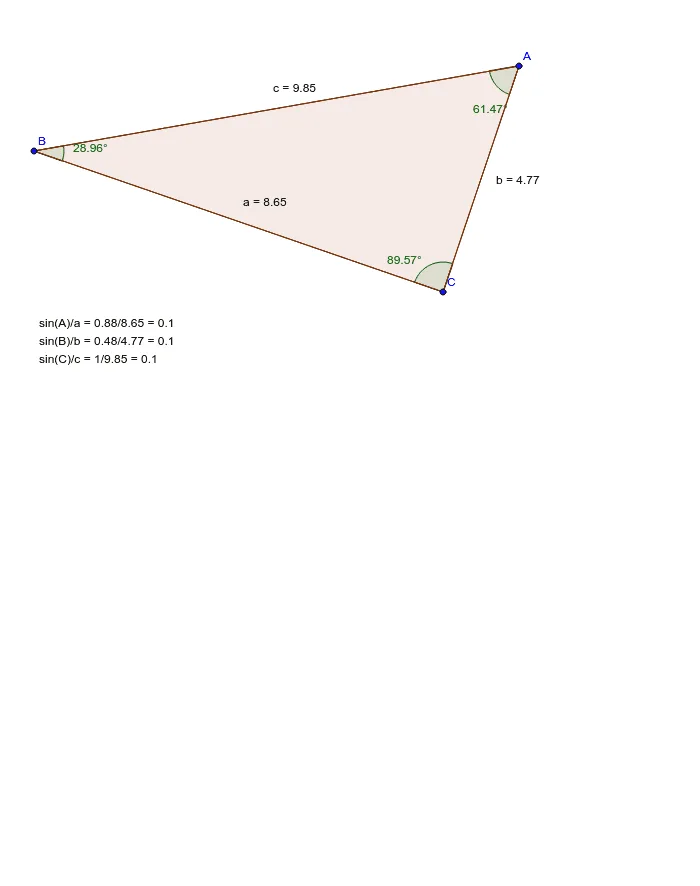
This example demonstrates the application of the Sine Law in any triangle by dynamically showing the relationship between angles and the sines of their opposite sides, verifying the theorem. Core math concepts include the Sine Law, similar triangles, and geometric construction. Construction highlights involve using GeoGebra commands like Segment, Polygon, and Angle to draw a triangle, calculating the sine of each angle and the ratio of its sine to the corresponding side length, and displaying the results via text1. Suitable for high school mathematics teaching to help students visually understand and apply the Sine Law in solving triangle problems.
GeoGebra Commands & Parameters
Segment(C, B) → aSegment(C, A) → bSegment(A, B) → cPolygon(B, C, A) → poly1, a_1, b_1, c_1Angle(B, A, C) → αAngle(A, C, B) → βAngle(C, B, A) → γ
AI Drawing Prompt Reference
Draw a triangle and dynamically show the relationship between its three angles and the sines of their opposite sides, verifying the sine law. Start by drawing three line segments to form the triangle, then calculate the sine of each angle and display the ratio of each sine to its corresponding side length, showing the results via text, suitable for high school math teaching to help students visually understand and apply the sine law in solving triangle problems.
The prompt above was compiled from the original drawing commands and is for reference only.