
Euclidean Root Calculator by David Peterson
Loading the math board and drawing, please wait…
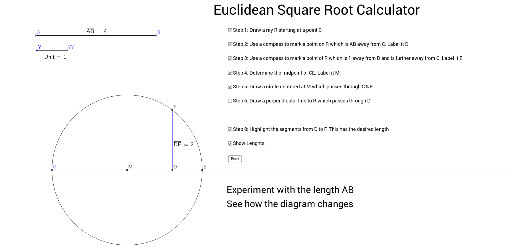
This example demonstrates the Euclidean algorithm for root calculation and illustrates the relationship between roots and tangent lines. Core math concepts include root computation, tangent line equations, coordinate geometry, linear equations, and rotational transformations. Constructed using GeoGebra commands like Line, Point, Segment, Distance, Circle, Intersect, Midpoint, OrthogonalLine, and Ray. Suitable for high school and above learners to understand root calculations and geometric properties.
GeoGebra Commands & Parameters
Line(Z, ZZ) → aPoint(a) → APoint(a) → BSegment(A, B) → bPoint(Circle[Y, 1]) → YYSegment(Y, YY) → cDistance(Y, YY) → distanceYYYDistance(A, B) → distanceABLine(X, XX) → dPoint(d) → CCircle(C, b) → eIntersect(e, d, 2) → DCircle(D, c) → fIntersect(f, d, 2) → ESegment(C, E) → gMidpoint(C, E) → MCircle(M, E) → hOrthogonalLine(D, g) → iIntersect(h, i, 2) → FSegment(F, D) → jDistance(D, F) → distanceDFRay(C, E) → k
AI Drawing Prompt Reference
Draw a line segment, find its midpoint and draw a circle. From a point on the circle, draw a line segment and measure its length. Then draw a new line and find a point on it. Draw a circle with the line segment as the radius. Find the intersection points of the circle with the line, connect them. Find the midpoint of these points, draw a circle, and draw a line perpendicular to the segment connecting these points. Find the intersection points, connect the intersection point to the circle point, and draw a ray in the direction of the segment connecting the two points.
The prompt above was compiled from the original drawing commands and is for reference only.