
Sine Law Ambiguous Case Demonstration
Loading the math board and drawing, please wait…
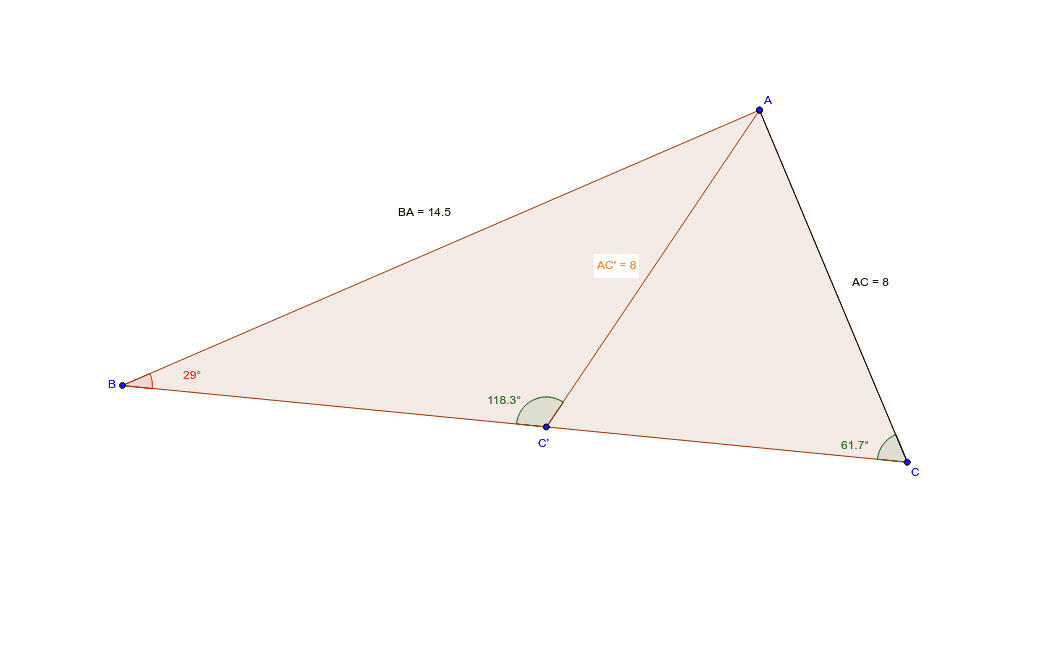
This example demonstrates various applications of the sine law in ambiguous cases by dragging points A, B, or C. It involves core math concepts like the sine law, triangle solving, and geometric constructions. Constructed using GeoGebra commands and objects such as Polygon, Segment, OrthogonalLine, Mirror, Angle, Distance, and Midpoint. Suitable for high school mathematics teaching to understand the ambiguous solutions of the sine law and practical applications.
GeoGebra Commands & Parameters
Polygon(A, B, C) → poly1, c, a, bSegment(A, C) → dOrthogonalLine(A, a) → eMirror(C, e) → C'Mirror(A, e) → A'Segment(C', A') → b'Angle(A, C', B) → αAngle(A, C, B) → βAngle(C', B, A) → γDistance(B, A) → distanceBAMidpoint(B, A) →Distance(A, C) → distanceACMidpoint(A, C) →Distance(A, C') → distanceAC'Midpoint(A, C') →
AI Drawing Prompt Reference
Draw a triangle with draggable vertices to demonstrate the ambiguous case of the sine law. Construct the triangle, then draw a perpendicular line from one vertex to the opposite side. Reflect another vertex across this perpendicular line, and connect the reflected point to the remaining vertex. Label three relevant angles and show several key side lengths with their midpoints. This illustrates the geometric relationships in the ambiguous sine law case.
The prompt above was compiled from the original drawing commands and is for reference only.