
Sine-Cosine Applet: Interactive Demonstration of Trigonometric Functions and Geo
Loading the math board and drawing, please wait…
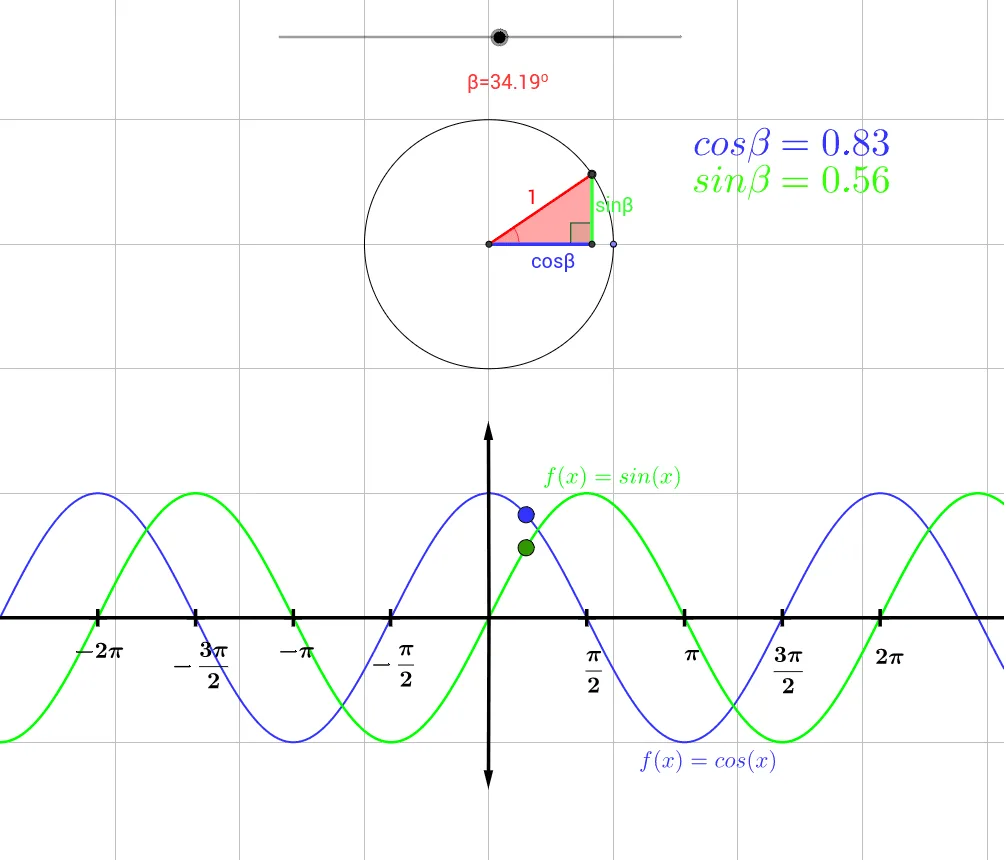
This example dynamically illustrates the geometric significance of sine and cosine functions using GeoGebra, demonstrating their relationship with coordinate systems, equilateral triangles, geometric transformations, and three-dimensional vectors. Key mathematical concepts include trigonometry, coordinate geometry, geometric transformations, and vector operations. Construction involves GeoGebra commands such as Intersect, Point, Circle, Rotate, Segment, OrthogonalLine, Polygon, Angle, and Vector, along with objects like A, B, C, z, and others. Suitable for high school students or college undergraduates to understand the connection between trigonometric functions and geometry, and to explore dynamic effects of geometric transformations.
GeoGebra Commands & Parameters
Intersect(xAxis, yAxis) → APoint(xAxis) → BCircle(A, B) → cPoint(c) → CRotate(C, ((z * 180 / π))°, A) → C'Segment(A, C) → aOrthogonalLine(C', a) → bPolygon(A, D, C') → poly1, c', a_1, dAngle(A, D, C') → αIntersect(g, h, (0, -3)) → IVector(I, J) → wVector(I, K) → iAngle(C', A, D) → β
AI Drawing Prompt Reference
Draw a coordinate system with point A at the origin and point B on the x-axis. Draw a circle with A and B as centers, and take a point C on the circle. Rotate C around A by an angle of z times 180 divided by π. Connect A and C, and draw a perpendicular line to AC to form a triangle. Construct a quadrilateral with vertices A, D, and C', and label the angle α. Find point I on the intersection of g and h, and draw vectors w from I to J and i from I to K. Label the angle β between C', A, and D.
The prompt above was compiled from the original drawing commands and is for reference only.